Slack
Hansard can post to Slack when a conversation finishes, mirror conversations into Slack threads as they happen, and post a daily digest. Slack posting is off until you set it up.
- App
- Settings → Slack
- CLI
hansard notify slack
Interactive bot
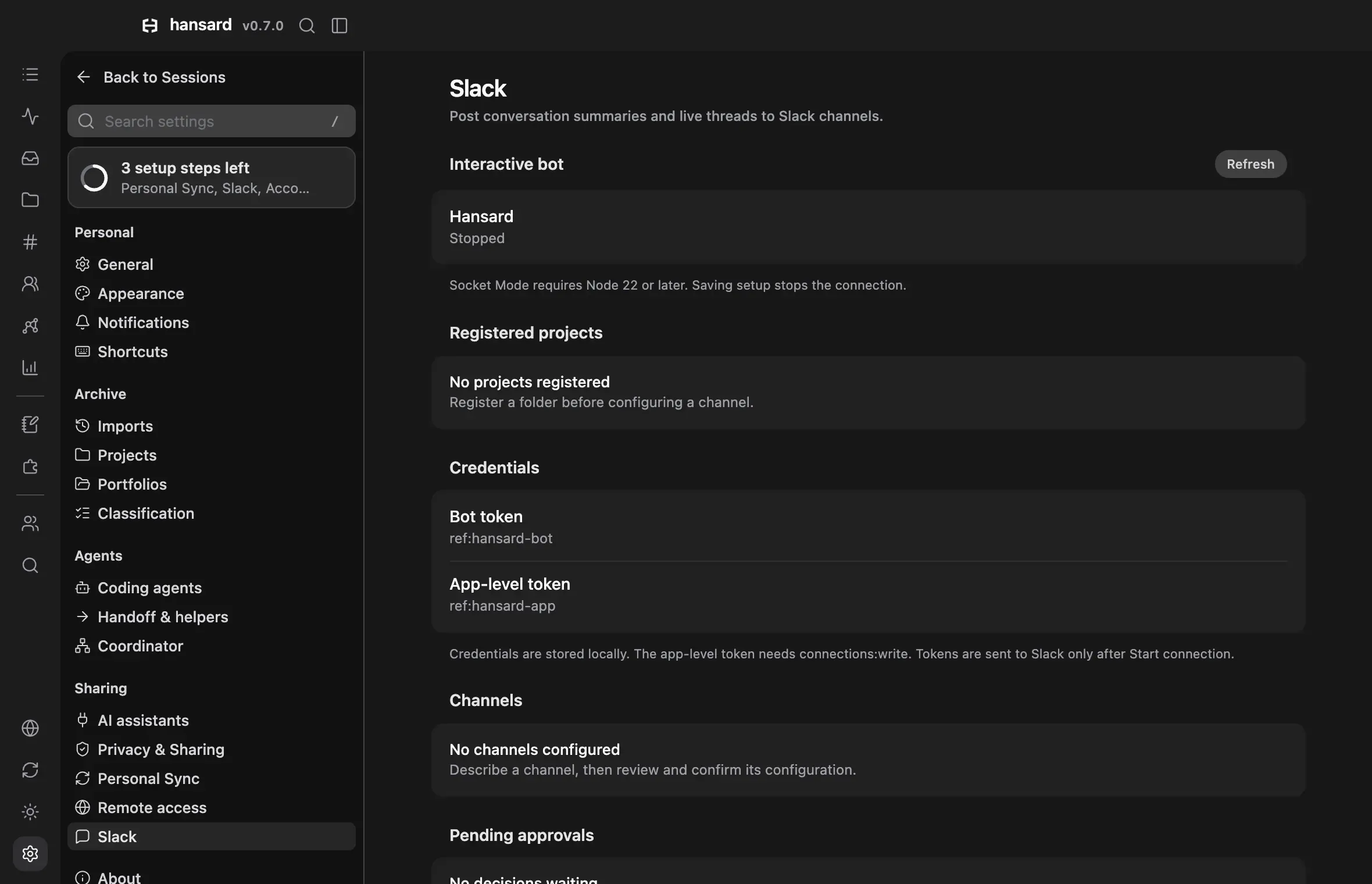
Section titled “Interactive bot”The Interactive bot section adds one private bot with a confirmed configuration for each channel. A channel can combine these roles:
| Role | Behavior |
|---|---|
| Broadcaster | Posts recent archived excerpts into conversation threads. Replies become requests for an isolated continuation. One Broadcaster configuration can be enabled. |
| Tag-to-run | Starts a configured agent after an approved mention. Replies continue its run after approval. Orchestrator mode uses up to three helpers in the same project. |
| Digest | Posts recent eligible conversation titles and counts at the configured interval. |
| Persistent watcher | Collects permitted channel activity and proposes tasks for owner approval. It never starts work automatically. |
| Approvals | Sends launch and supported native tool decisions to the thread. Only the owner can approve. |
Socket Mode requires Node 22 or later. It connects outward from the Mac and needs no public endpoint. Native execution currently supports Claude Code and Codex on macOS. Team memory and other isolated harness adapters are unavailable.
- Open Settings → Slack → Interactive bot and select Set up bot.
- Register the owner, workspace, app, bot, and channel IDs.
- Add an existing project folder and select its harness, model, and native permission mode.
- Copy the app manifest into Slack’s private app creation flow. Install the app with the listed scopes.
- Create an app-level token with
connections:write. Save that token and the bot token through the local credential form. - Invite the app to each permitted channel and select Start connection in Hansard.
- Mention the bot with a description, such as “Broadcast the Web project and act as a persistent watcher.”
- Review the proposed channel settings and confirm them.
The local channel form provides the same preview and confirmation flow.
Message display names and pictures use chat:write.customize. Mentions continue
to identify the installed Slack app. Channel instructions can select registered
projects, but they cannot grant new folders or change native permission modes.
Without owner prompts or channel access, each launch and continuation requires owner approval, and only the owner and listed requesters can submit requests. Guests, Slack Connect members, bots, unknown users, and direct messages from anyone but the owner never start agents. Configuration changes invalidate pending approvals. Redacted or incomplete approval details require review in the local Settings panel. The panel shows the complete saved task before execution. Saves that change only owner prompts, channel access, requesters, or allowed channels apply to a running connection without stopping it. Runs that the new settings no longer permit stop.
Agents run inside a project filesystem sandbox. They cannot read Hansard’s archive, Slack credentials, or unrelated folders. The sandbox blocks Keychain authentication and localhost proxies. Account modes that need these facilities are unavailable. The selected native permission mode remains unchanged.
Keep the app connection or hansard notify slack bot run process running.
Stopping it stops its agents. After restart, a new request needs owner approval.
The process that starts the bot owns its controls. Other local processes cannot
change its grants, approve its tasks, or stop its agents. Start the connection
in Settings to answer native questions in the local panel. A bot started by the
CLI has Slack controls, but a separate viewer cannot answer its native questions.
Stop that CLI process before changing its configuration from Settings.
Progress appears as paced status edits and complete responses. Broadcasts use at most 200 recent conversations within 24 hours and short excerpts from the archive. These limits do not guarantee a complete transcript mirror.
The existing outbound notifier below stays independently configured. Enabling both for the same conversations can produce duplicate posts. Team sharing remains opt-in and does not grant Slack execution access.
Prompts from Slack
Section titled “Prompts from Slack”The Prompts from Slack group holds the owner’s own switches. Each switch works only while the one above it is on, and keeps its saved value while it cannot apply.
| Setting | Behavior |
|---|---|
| Run your prompts | The owner’s own messages start and continue runs without an approval click. |
| Direct messages | The owner can message the bot directly. Anyone else’s direct message starts nothing and gets one short reply. |
| Project for direct messages | The granted project that a direct message uses when it names none. |
| Agents on this Mac | Direct messages from the owner can reach agents that run in a terminal or are paused on this Mac, as Running lists them. |
An app installed before direct messages were on lacks their scopes. After
turning on Direct messages, open App manifest, update the Slack app
from it, and reinstall the app. The manifest then adds the im:history and
im:read scopes, the message.im event, and the app’s Messages tab.
hansard notify slack bot manifest --direct-messages on prints the same
manifest.
A top-level direct message is a task for the default project. A message that
starts with project:<id or name> uses that granted project instead. Quote a
name with spaces, as in project:"Web App" Fix the build. Without a default
project or a prefix, the bot replies with the granted project IDs. Each
top-level message starts its own thread, and a reply in that thread continues
the same run. help or an empty message gets a short usage reply. These tasks
run in the project’s sandbox, like channel runs. The bot doesn’t read attached
files yet, so send each task as text.
With Agents on this Mac on:
agentslists up to 20 agents, numbered. A list number stays valid for 30 minutes.agent:<number> <words>, oragent:followed by six or more characters of the session ID and the words, sends the words. A reply in that thread sends more words to the same agent.- A paused agent resumes where it ran, as Resume in Running does. Hansard delivers the words once the agent has been idle at its prompt for 5 seconds. If it does not start within 3 minutes, the bot says so.
- An agent that waits on an approval or a question is never typed into. The words wait until it returns to its prompt.
- For Claude Code and Codex, the agent’s next complete reply appears in the thread. For other harnesses, check the agent on the Mac.
agents and agent: in a channel start nothing. The bot replies that live
agents take messages only in a direct message.
When an agent asks you a question with ask_user, the question also arrives
in your direct message with the bot as a card, with Approve, Deny, and
Deny with a note. Only your own press on the card answers it. After
Deny with a note, your reply in the card’s thread is the note.
Channel access
Section titled “Channel access”Channel access lists each allowed channel. Its Edit dialog sets who besides the owner can send there and how their runs start. A channel without its own setting keeps the behavior above.
| Setting | Choices |
|---|---|
| Who can send | Only you, People you list (the owner and the listed requester IDs, one list for all channels), or Everyone in the channel (any full member, checked against the channel’s members). |
| Approval | You approve each run (the default) or Runs start without approval. |
| Runs per person each day | Runs without approval for each person over 24 hours, from 1 to 100. The default is 10. |
| Runs at once | Runs without approval from people on the channel’s default at the same time, from 1 to 5. The default is 2. |
Runs start without approval only when the channel’s project uses Claude Code’s Manual or Plan mode, where Claude Code asks before every edit, every command that is not read-only, and every read outside the project, Claude Code’s Auto mode, where Claude Code’s classifier decides tool use inside the same sandbox, or Codex’s Read only mode, where Codex asks before every edit and every command that is not read-only. Under any other mode, Accept edits and Codex’s Auto and Full access included, requests still wait for the owner, and the dialog says so. Tool approvals from these runs still go only to the owner. A person starts new threads and continues only their own runs without approval. Another person’s run, or a thread with archived context, needs the owner. Over a limit, the bot replies with the limit and starts nothing. A person can have at most three requests waiting for approval.
People in this channel, at the end of the Edit dialog, lists everyone the bot has seen send a message in that channel, by their Slack name. The bot keeps each person’s member ID, name, and when it last saw them, never what they wrote. Each person gets one Access choice:
| Choice | Behavior |
|---|---|
| Channel default | The channel’s project, approval, and limits. |
| You approve each run | The owner approves each run, and the person uses only the channel’s project. |
| Their own scope | The projects the person can use, whether their runs need approval, and their own runs each day and runs at once. |
| Can’t send here | In a channel for People you list only, for someone who is not on the list. |
In a channel open to Everyone in the channel, a person that the owner has
not reviewed starts at You approve each run. A person on the list of
requesters starts at Channel default. Runs at once in the channel
counts the runs of everyone on the channel’s default together, and a person
with their own scope has their own count. A mention that starts with
project:<id or name> runs in another granted project that the person can
reach. Quote a name with spaces, as in project:"Web App". A reply runs in
its thread’s project.
Before a save gives anyone more access, such as a new audience, another
person, another project, runs without approval, or higher limits, Settings
shows a notice. It says who can start runs on the Mac, in which projects, and
with which limits, what they can’t do, and the risks. Accept and save
saves the change and records when the owner accepted. Cancel saves
nothing. A save that narrows access shows no notice. From the CLI,
hansard notify slack bot configure --file <json> prints the same notice and
saves only when run again with --accept-coworker-access and the code it
prints.
Guests, people from other organizations (Slack Connect), and bots can never
send. Other people’s runs stay in the channel’s project inside the sandbox and
reply only in their thread. Each such run, approved or not, gets a provider
home of its own that leaves out the owner’s personal instruction and memory
files (Claude Code’s CLAUDE.md and rules, Codex’s AGENTS.md), the owner’s
Claude Code allow rules, plugins, hooks, MCP servers, and the project’s own
Claude Code settings, and the owner’s Codex MCP servers, connectors, and
plugins. A Codex run for another person holds no sign-in: it reaches its model
only through the router in Accounts, with a key that works only for that run
while it works, so these runs need the router with a Codex account. Such a run
has no other network, so a command that needs the internet fails even when the
owner approves it. The sandbox keeps every such run’s reads to the project, its
own home, and system folders. These runs still follow the project’s own
instructions: Claude Code reads the project’s CLAUDE.md and the files it
imports from inside the project, such as AGENTS.md, and Codex reads the
project’s AGENTS.md.
The home is removed 15 minutes after the run’s last reply. A reply in
the thread after that starts a new run without the earlier context, as a new
request would, and the bot says so in the thread.
What Hansard posts
Section titled “What Hansard posts”| Post | Content | Default |
|---|---|---|
| Summaries | One recap per conversation after it has been quiet for 10 minutes: the goal, the result, edited files, and activity counts. | On once Slack is set up |
| Live threads | Every user and agent message, posted whole into one thread per conversation, in batches every 45 seconds. Tool calls are left out unless notify.slack.stream.includeTools is true. |
Off |
| Daily digest | One summary per day, grouped by person or device, with conversation, repository, model, and token totals. | Off |
| Behavior digest | A comparison of one period with the previous one. Posts only when you run it. | Manual |
Hansard posts from its archive, with redaction applied, never from the harness’s original files. Subagent runs, SDK batch jobs, and imported ChatGPT, Claude.ai, and Gemini conversations never post as summaries or live threads. A conversation you resume later opens a new thread with only the new messages.
Set up the Slack app
Section titled “Set up the Slack app”Creating the Slack app is a CLI step. Before you start, create the channels you want to post to and decide which repositories may post.
-
Start the guided setup:
Terminal window hansard notify slack setupIt opens Slack’s app creation page with a prepared manifest. The app asks for
chat:write,chat:write.customizeso live threads can show each speaker’s name, andchannels:readplusgroups:readso setup can list channel names. It cannot read Slack messages. Paste the bot token when asked, then enter channel IDs. Setup ends by sending a test post. -
In Slack, invite the bot to each channel.
-
Check the saved configuration and preview a test message:
Terminal window hansard notify slack statushansard notify slack test --dry-run -
Send the test when the preview is right:
Terminal window hansard notify slack test
Manage Slack in the app
Section titled “Manage Slack in the app”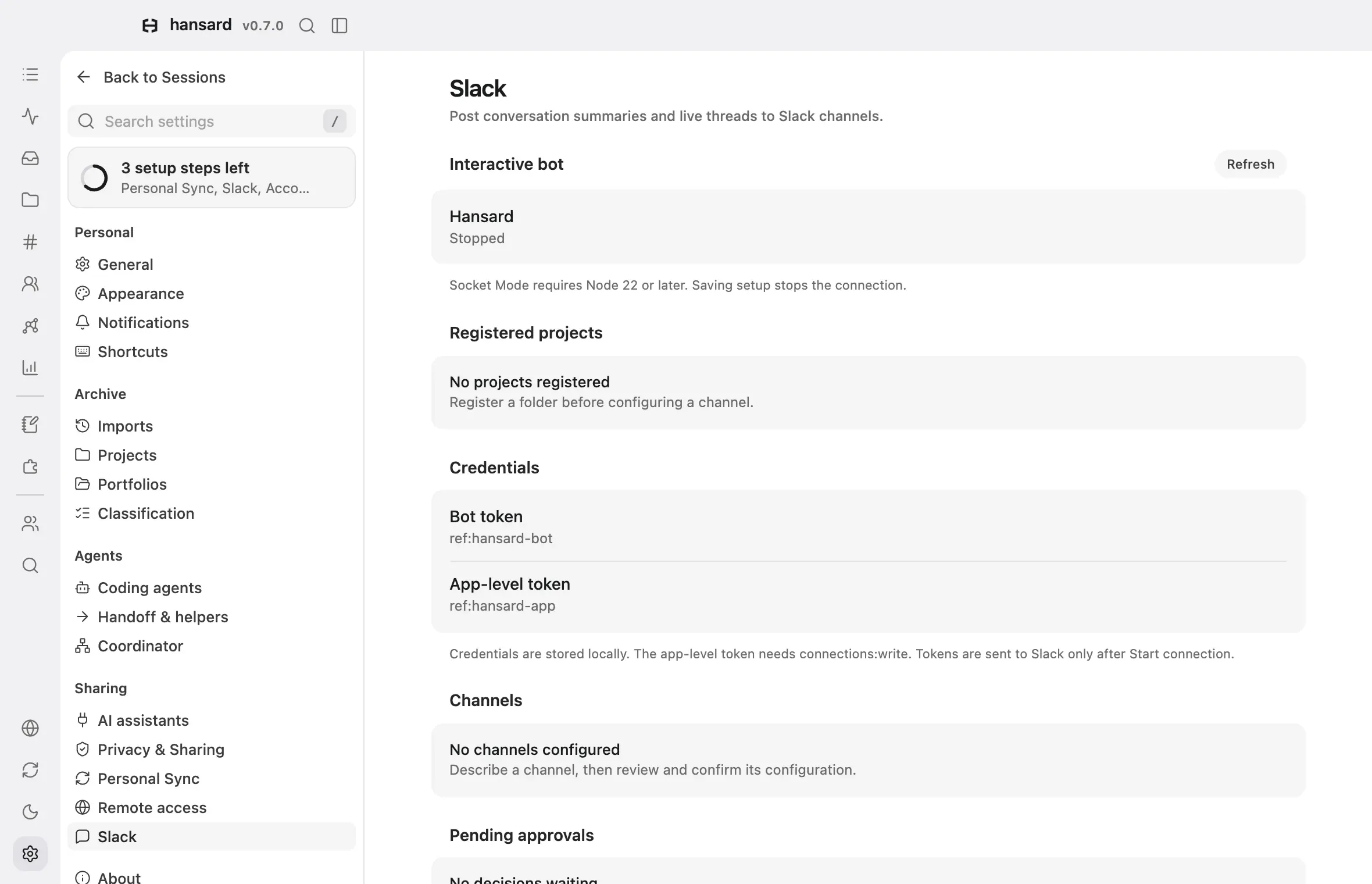
-
Open Settings → Slack. If Slack is not connected yet, select Add bot token, enter a label, and paste a bot token from your Slack app.
-
Use Post to Slack to pause or resume all posting. Your rules and digest stay saved while it is off.
-
Under Bot tokens, the token marked Default posts for every rule and digest that does not choose another. To change it, choose Set as default from another token’s menu. Select Add bot token to save another token.
-
Under Posting rules, select Add rule or edit a rule to set which conversations post, the summary channel and quiet time, the live thread, and Post as.
-
Under Daily digest, turn on Post a daily digest and set the Channel ID, Send at as a local hour, the period it Covers, and Post as. Changes save automatically.
The app’s name and icon in Slack come from Slack. Change them in your Slack app settings, which Open Slack app settings under Bot tokens opens.
The app does not post a digest preview. To see the complete digest before anything posts, run:
hansard notify slack digest run --dry-runAn empty digest posts nothing.
Configure posting from the CLI
Section titled “Configure posting from the CLI”Turn summaries and live threads on or off separately:
hansard notify slack enable \ --summaries on \ --summary-channel C0123456789 \ --quiet-minutes 10 \ --firehose off \ --repos github.com/example/appWith no --repos, every eligible conversation posts.
Route conversations to different channels
Section titled “Route conversations to different channels”Routes send different conversations to different channels or through
different bots. A conversation posts to every route it matches, in order. A
route marked --exclusive stops later routes from also receiving it.
Store a bot token under a name so it never appears on a command line:
hansard notify slack token add example-botNamed tokens live in a local file readable only by you. Status output shows only the name and the last characters of the token.
Add a route that uses the stored token:
hansard notify slack route add \ --match-owners example \ --summary-channel C0123456789 \ --token ref:example-bot \ --exclusiveRoutes can also match repositories (--match-repos), repository hosts
(--match-hosts), harnesses (--match-providers), archive scopes
(--match-scopes), local folders (--match-path), portfolios
(--match-containers), and devices (--match-devices). A route with no match
options matches every conversation. List routes and their channels without
posting:
hansard notify slack route listhansard notify slack route reorder --order <id,id> sets route priority.
Use the route IDs from route list in the desired order.
Post a Behavior digest
Section titled “Post a Behavior digest”hansard notify slack digest behavior --period 1m --dry-runIt uses the daily digest’s channel and token. Remove --dry-run to post.
Open conversations from Slack
Section titled “Open conversations from Slack”Summaries and live thread headers include an Open in Hansard app link. It
opens the Mac app and selects the conversation. Run hansard app --no-fallback
to confirm the app is installed. To link to a hosted viewer instead, set
notify.slack.viewerBaseUrl to its address. Set it to an empty string to leave
the link out.
When posts are delayed
Section titled “When posts are delayed”Going offline pauses posting, never archiving. Failed posts keep their place and retry about once a minute, so everything posts after you reconnect. A post can occasionally appear twice. When one conversation has more than 20 messages waiting, Hansard posts the latest 20 and a note with the number skipped. The full conversation stays in your archive.
Stop posting
Section titled “Stop posting”hansard notify slack disableMessages already in Slack stay there. Delete them with Slack’s controls, and revoke the app’s token in Slack when you retire the connection.