Personal Sync
Personal Sync backs up your whole archive to a bucket, cloud drive, or shared folder you own and brings your other devices’ conversations into each installation. It is for one person. To share selected conversations with other people, use Teams.
- App
- Settings → Personal Sync
- CLI
hansard personal-sync
Personal Sync has no repository, folder, or harness selector. Every device uploads its conversations, memories, original harness files, attachments, and captured artifacts. One Hansard installation connects to one Personal Sync space, and any number of your devices can connect to the same space.
An older installed copy preserves a newer copy’s cached profile manifest, including after an identity error during sync.
Windows devices can join the same backup as macOS and Linux devices. Keep each
active archive on a local filesystem; Personal Sync transfers verified copies
through the shared destination. A Windows shared-folder URL uses the form
file:///C:/Shared/Hansard. Windows flushes file contents and activates verified
generations atomically, but cannot provide Unix directory-fsync guarantees:
sudden power loss may lose the latest directory publication. The next receive
verifies the committed remote revision and resumes.
Archive schema 14 uses portable filenames for provider session IDs. Before
receiving older filenames containing : or / on Windows, update the source
computer and run hansard update --dry-run --since all, then
hansard update --since all while the original provider histories are still
available. Let that computer finish uploading before connecting Windows.
Unavailable originals remain archived without automatic filename migration.
Existing revision spaces replace superseded file families on upload. Legacy
archive-files destinations retain old remote names; after the source refresh,
create a revisions-v1 backup under a fresh prefix instead of reusing that
legacy destination.
The update command preserves manually imported web chats. Reimport their
original exports separately with hansard import chatgpt <path> or
hansard import claude-web <path> before publishing the refreshed backup.
In revision spaces, cloud chat accounts have their own backup namespaces.
ChatGPT, Claude, Gemini, and Perplexity conversations and account-tagged
memories belong to the provider account; the computer that captured them is
recorded as a writer. One computer captures each account from the browser
extension and the others receive it, so every device lists the same
conversations. Settings shows these under Cloud accounts, with the provider,
account label, the computer that captures each, and sync status; choose another
computer there, or run hansard personal-sync cloud-accounts and
hansard personal-sync cloud-accounts owner <account-id> --device <device-id>.
When the chosen computer has not captured an account or reported for three
days, another one captures it meanwhile.
Existing revision backups move cloud entries out of the current device
revision on the next upload, after the account backup succeeds. Earlier
revisions remain intact and no reimport is needed. Update every connected
client, then run hansard sync --target personal-sync or wait for automatic
sync. Use the configured target name if it differs. Legacy archive-files
spaces keep their existing layout and require a fresh prefix to use revisions.
Set up Personal Sync in the app
Section titled “Set up Personal Sync in the app”- Conversations
- Original files
- Memories and attachments
-
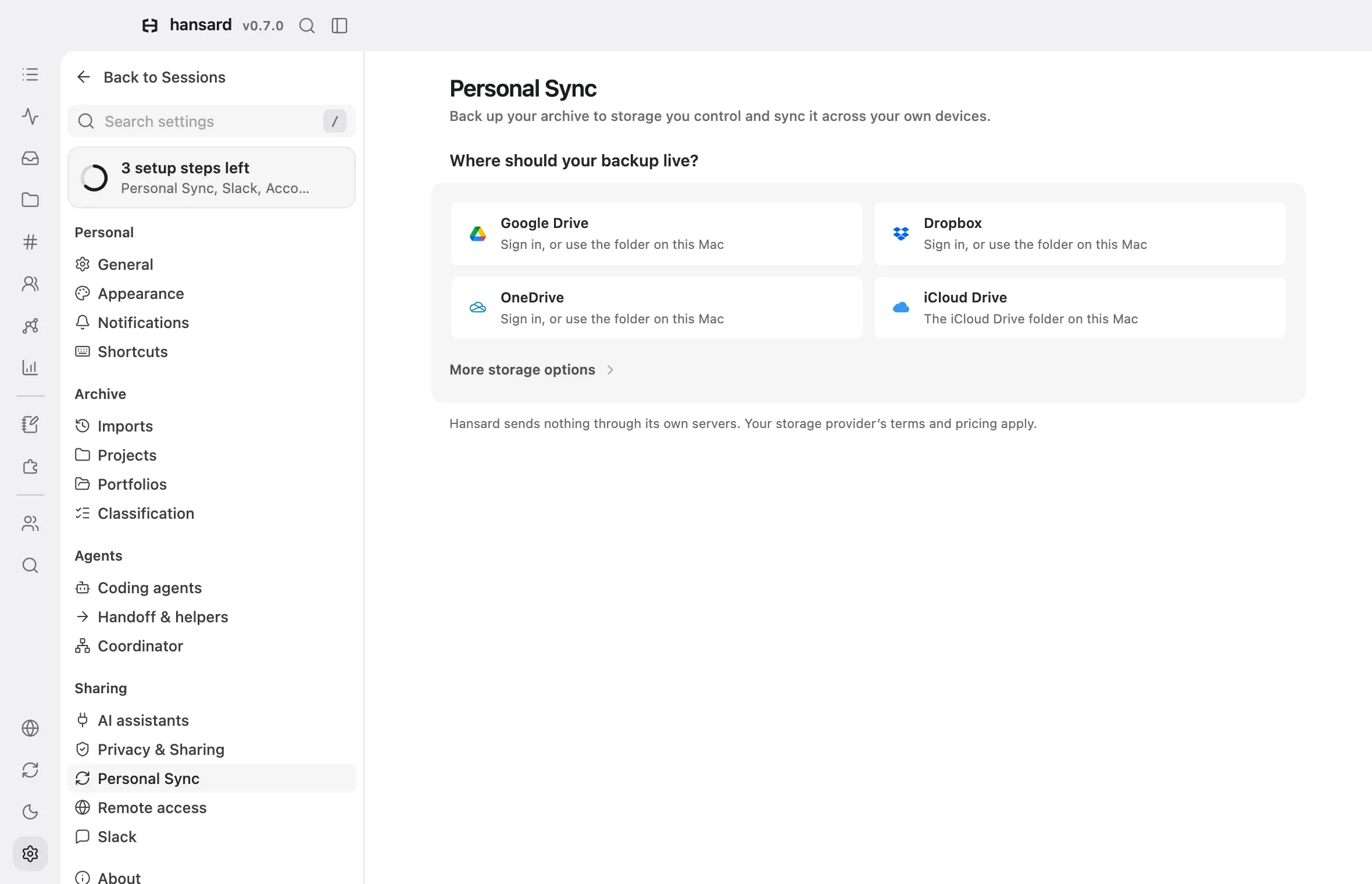
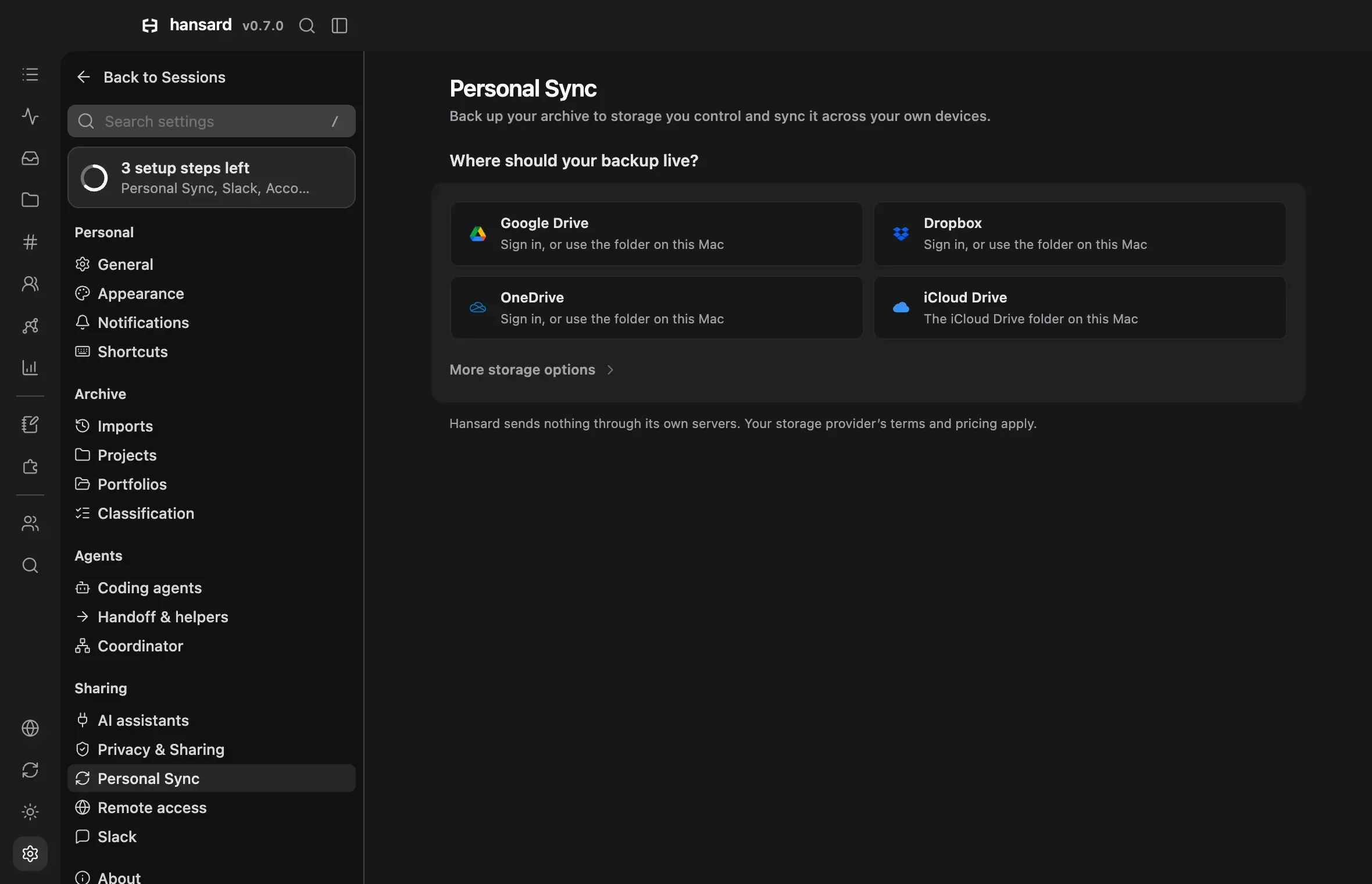
Open Settings → Personal Sync.
-
Under Where should your backup live?, choose Google Drive, Dropbox, OneDrive, or iCloud Drive. Cloudflare R2, Amazon S3, other S3-compatible storage, and any other folder are under More storage options.
-
For Google Drive, Dropbox, or OneDrive, sign in and finish in your browser. Without Hansard’s own app for that provider, open Sign in with your own Google Drive app (or the OneDrive or Dropbox one), follow its steps to register an app, and select Sign in with this app. To use the folder the provider’s desktop app keeps on this Mac instead, select Use the Google Drive folder on this Mac instead (or the OneDrive or Dropbox one). For a synced folder, open or create the folder that holds the backup. macOS asks once to let Hansard open cloud storage folders.
-
For a bucket, follow the steps under the provider’s name. Each step opens the provider’s page, links its own guide, draws what that page shows, and holds the fields its result goes in, with the provider’s own names for the bucket, the access key and its secret, and the endpoint. They stay on this computer. Amazon S3’s Endpoint, a temporary Session token, and the Folder in bucket (default
hansard) are under Advanced. -
Read what syncs and where, choose a Direction (Upload and receive, Upload only, or Receive only), and select the acknowledgment.
-
Select Start backup. When the chosen folder or account already holds a backup from another of your devices, the button reads Join this backup.
The first upload and receive continue in the background. The page then shows one status card: where the backup lives, its state, the last upload and receipt, and the storage it uses. Needs attention lists each problem with the action that fixes it. Devices lists this computer first, and Sync details under each device shows its capture, upload, receipt, and indexing stages. Select Edit to change the schedule or the storage, or select Disconnect under Settings to remove this computer from the backup.
Set up a Cloudflare R2 bucket
Section titled “Set up a Cloudflare R2 bucket”R2 keeps the backup in a bucket in your Cloudflare account, with a key that reaches only that bucket. Hansard walks through these steps in Settings → Personal Sync and in guided setup.
-
Sign in to the Cloudflare dashboard, or create an account. Open R2 object storage under Storage & databases. The first time, Cloudflare adds R2 to your account at checkout. R2 has a free tier.
-
Select Create bucket and name it, such as
hansard-archive. Keep the default location and storage class. Cloudflare’s guide covers bucket names. -
On the R2 overview, select Manage beside API Tokens, then Create Account API token. Choose Object Read & Write, then Apply to specific buckets only with your bucket, and create the token. Cloudflare’s guide explains the permissions.
-
Copy the Access Key ID, the Secret Access Key, and the S3 endpoint (
https://<ACCOUNT_ID>.r2.cloudflarestorage.com) into Hansard. Cloudflare shows the secret only once. If it is lost, create a new token. A bucket created in a jurisdiction uses that jurisdiction’s endpoint, such ashttps://<ACCOUNT_ID>.eu.r2.cloudflarestorage.com. An endpoint pasted with the bucket at its end fills the bucket too. -
Select Start backup. The status card shows the first upload.
Amazon S3 takes a bucket, a policy limited to it (Hansard fills in the policy to copy), a user with that policy, and an access key from that user’s Security credentials; see Creating a bucket and managing access keys. Other S3-compatible storage works the same way. For Backblaze B2, add an application key limited to the bucket and use the endpoint its bucket page shows.
Google Drive, OneDrive, and Dropbox
Section titled “Google Drive, OneDrive, and Dropbox”When a release includes Hansard’s own app for a provider, its sign-in button needs no setup, and Other ways to connect holds the alternatives. Otherwise, register an OAuth app as described below, open Sign in with your own Google Drive app (or the OneDrive or Dropbox one), and sign in with your app’s client ID. For Google Drive and OneDrive, that section walks through registering the app step by step. Use the same app and provider account on every device. Sign in separately on each computer. Dropbox asks apps not to have people register their own, so where Hansard’s Dropbox sign-in is available, only the synced folder is offered beside it. Hansard keeps app secrets and refresh tokens in private local state and excludes them from the backup.
These sign-ins reach only a private folder for Hansard in your account, which no one else can open. Teams therefore use the folder each member’s Google Drive, Dropbox, OneDrive, or iCloud Drive app keeps in sync, shared from the provider’s own app.
| Provider | App registration | Access |
|---|---|---|
| Google Drive | Enable the Google Drive API. Create a Desktop app OAuth client in Google Cloud. Configure its consent screen. | The drive.file scope permits files created or opened by this app. Hansard creates a dedicated Hansard backup folder. |
| OneDrive | Register an app in Microsoft Entra for work, school, and personal accounts. Configure Mobile and desktop applications as a public client. | Grant delegated Files.ReadWrite.AppFolder and offline_access. Hansard uses the app folder. |
| Dropbox | Create a Scoped access app with App folder access in the App Console. | Enable account_info.read, files.metadata.read, files.content.read, and files.content.write. |
Register this exact redirect URI for OneDrive and Dropbox:
http://127.0.0.1:53682/cloud-storage/callbackGoogle Desktop app clients permit loopback redirects without a registered URL.
If the Entra portal rejects an HTTP 127.0.0.1 URI in its form, add it under
the app manifest’s publicClient.redirectUris. An organization can require
administrator consent. Google apps in external Testing mode can issue
refresh tokens that expire after seven days. Use a suitable publishing status
for unattended backups.
In Settings, enter the client ID and Google’s client secret. Public OneDrive and Dropbox apps can leave the secret blank. Select Sign in with this app. If the browser blocks the new window, select Open the sign-in page. Cancel sign-in or closing the dialog cancels an unfinished authorization. To reconnect an expired grant, select Edit, select Change under Storage location, choose the provider, and sign in again with the same app.
For CLI setup, keep credentials in a local JSON file:
{ "clientId": "your-app-client-id", "clientSecret": "your-app-secret-if-required" }Google’s downloaded Desktop app JSON also works. Omit clientSecret for apps
that do not need it. Authorize one provider:
hansard personal-sync auth google-drive --setuphansard personal-sync auth google-drive --app-credentials /path/to/app.jsonhansard personal-sync accountsReplace google-drive with onedrive or dropbox as needed. --no-browser
prints the authorization URL. Complete sign-in on the computer running Hansard,
because the callback listener is local. Then use the returned account reference:
hansard personal-sync create --type google-drive --account-ref <ref> --yesOn the next device, authorize the same app and account, then use connect
instead of create. Keep the backup prefix the same. OneDrive and Dropbox
prefixes are case-insensitive and Hansard stores them in lowercase. Google
Drive finds the app’s backup folder automatically. If there are multiple
folders, use --folder-id or the Google Drive folder ID from the first
device’s storage settings. A manually entered folder must already be accessible
to that OAuth app. An arbitrary shared folder URL does not grant app access.
Cloud drives support revisions-v1 Personal Sync. Teams and legacy
archive-files backups use the existing storage choices. Hansard checks that
the provider rejects conflicting writes before it publishes a new backup.
It refuses enrollment if that check fails. Account policies or app permissions
can prevent setup. The dialog reports these failures before starting the backup.
Cloud drive APIs are convenient for existing subscriptions. S3-compatible storage remains preferable for large archives and frequent updates. Drive’s file ID index adds requests, and providers can throttle transfers. These adapters transfer backup objects. Keep the active archive and SQLite indexes on local storage instead of placing a live database in a cloud-synced folder.
Set up Personal Sync from the CLI
Section titled “Set up Personal Sync from the CLI”-
Create the space on your first device. A shared or mounted folder needs no credentials:
Terminal window hansard personal-sync create --endpoint file:///home/user/hansard-privateFor Cloudflare R2, pass the S3 API URL and bucket:
Terminal window hansard personal-sync create \--target r2 \--endpoint https://ACCOUNT_ID.r2.cloudflarestorage.com \--bucket example-hansard-archiveFor Amazon S3 or another compatible service, use
--target s3or--target customand add--region. Supply credentials with--access-key-idand--secret-access-key, or setAWS_ACCESS_KEY_IDandAWS_SECRET_ACCESS_KEYso they stay out of your shell history. -
Review the preview and confirm. Hansard refuses to create a space where one already exists, then uploads this device’s archive. In a script, add
--yesto confirm. -
On each other device, connect with the same
--target,--endpoint,--bucket,--region, and--prefixvalues and that device’s own credentials:Terminal window hansard personal-sync connect --endpoint file:///home/user/hansard-privateConnecting downloads and verifies the other devices’ archives before it reports success.
-
Check the connection:
Terminal window hansard personal-sync statushansard sync status
To run a sync pass now instead of waiting for the schedule, run hansard sync.
Publish from a dedicated host
Section titled “Publish from a dedicated host”A headless computer can publish captured history without running the normal
background analysis. Connect it to an existing revision backup with
--mode upload and the destination options above. Then preview the publisher
preset with an explicit source list:
hansard personal-sync publisher --sources codex-cli,claude --dry-runhansard personal-sync publisher --sources codex-cli,claudehansard watcher startThe preset disables automatic source discovery. The watcher imports the chosen sources, including conversations started outside Hansard, and publishes their revisions. It skips background search indexing, Stats aggregation, labeling, memory backup, skill scans, and plan-usage polling. Only heartbeat, project, and reader profile sections publish.
The complete existing archive still uploads. The source list controls new capture, not which already archived conversations, memories, raw records, or attachments leave the computer. Use a dedicated Hansard home when a narrower archive is required.
hansard personal-sync publisher --disable resumes background processing while
keeping the saved direction, source list, and profile-section choices.
Keep mutable databases and provider state on local storage. This preset does
not manage cluster allocations or provide remote execution access. See
Remote host commands.
Keep redundant storage copies
Section titled “Keep redundant storage copies”One Personal Sync space can use a primary destination and up to 16 additional storage copies. Each copy preserves the same profile and all devices’ uploaded conversations, memories, original harness files, attachments, and artifacts. The copy’s contents follow the existing backup, including uploads from devices other than the computer that maintains it.
In Settings → Personal Sync → Storage copies, choose Add storage location and choose the storage the same way as for the backup itself. Choose an empty folder or bucket prefix. Revision backups can also sign in to Google Drive, OneDrive, and Dropbox. Each destination uses its own credentials.
hansard personal-sync storage add --target personal-sync --type folder --folder /path/to/backup-copy --name "Backup copy" --yeshansard personal-sync storage list --target personal-synchansard personal-sync storage sync --target personal-syncUse --type for the new provider and --target for the existing connection.
For a cloud drive, use --type google-drive|onedrive|dropbox and
--account-ref <ref>. For a bucket, use --type r2|s3|custom with its endpoint,
bucket, prefix, and credentials. hansard help personal-sync lists the flags.
Manual sync updates every copy. Scheduled sync attempts each copy at most once every 30 minutes while this computer is running. Copy now starts an update immediately. Each copy shows its own last successful update and error. One failed copy does not stop the others. Configuration stays on the computer that maintains the copies.
Copies are recovery destinations. Updates require the primary to be reachable,
and Hansard does not automatically move writes to a copy during an outage.
To recover, connect a fresh installation to a completed copy using its folder
or bucket settings and --mode receive. For cloud drives, first sign in with
the same provider account and app. Recovery does not need the primary.
Disconnect stops updates without deleting the copy. The CLI equivalent is
hansard personal-sync storage remove <copy-id> --target personal-sync.
Copies also retain objects deleted from the primary. They do not provide a
shared live SQLite database or automatic deletion across destinations.
Offload old files to the backup
Section titled “Offload old files to the backup”When the backup and a storage copy both hold verified copies, Hansard can free disk space by removing original harness files and attachments older than 30 days from this computer. Turn offload on, preview it, then apply it:
hansard config set storage.offload.enabled truehansard storage offloadhansard storage offload --yesOffload needs a storage copy that finished a verified update within the last
24 hours. Before it removes a file, Hansard checks that both destinations
return its exact size and SHA-256 checksum. Each destination also keeps a
recovery copy of every offloaded file, which adds to the backup’s size. Linked
files, files in use, and recent files stay on this computer. A pass handles at
most 100 files, and --days and --limit change the age and the count.
Opening or exporting a conversation downloads the files it needs and waits up to two minutes for them. To bring every file back first, such as before you open many old conversations or remove either destination, run:
hansard storage restore --yesBoth commands only preview until you add --yes. Offload applies only when
every installed copy of Hansard can restore files.
What syncs
Section titled “What syncs”Each device uploads only its own archive. Conversations received from your other devices appear read-only, labeled with the device they came from, and are never uploaded again from the receiving device.
An import removes a duplicate copy of a conversation, such as the copy the
Cursor app keeps in another of its stores, only when conversations archived on
this computer hold everything it recorded: its prompts and replies, tool calls
and their output, thinking, and attachments. Other copies of the same
conversation may hold it together, but a different conversation has to hold
all of it on its own. Copies received from your other devices never count,
since those devices can withdraw them. A copy that holds anything no other
copy has stays, and hansard doctor lists the conversations kept this way.
These stay on each device and never upload: search indexes, skill revision history, plugin evaluation results, OpenTelemetry payloads, helper-agent records, and Deep Recall research threads.
In revision spaces, each conversation’s view file (*.view.json) also stays on
its device, and so do the events (*.events.jsonl, or the event record that
holds them) of every conversation with messages. Receiving devices build both
from the transcript, for the knowledge graph and hansard export too. The next
upload of a conversation deletes every file under its name that an earlier
version uploaded and that upload leaves out, such as a view, events, or a raw
source copy the conversation no longer names. Later uploads repeat such a delete
only until the backup has applied it. A conversation that never changes
is not uploaded again, so run hansard personal-sync sweep --dry-run to count
the conversations whose backup still lists such files and
hansard personal-sync sweep to queue up to 200 of them for the next uploads.
A device on an earlier release applies these deletes and keeps deriving views
and events, but its knowledge graph loses the links it read from uploaded
events until it updates.
A running conversation’s imports store its provider file again each time, and uploads carry only the versions its captures name: the versions in between never leave the computer, and the archive deletes them a day later.
Each upload in a revision space also removes raw source versions that no conversation names anymore, such as the provider file a later import replaced, from the backup’s current file list, so a device you connect later does not download them. Devices that already received them keep their copies for now. A raw source that another conversation still names stays, and earlier revisions keep listing the ones removed. Removal waits while an older copy of Hansard on the same computer, such as an older desktop app, could still upload from the archive; once it is updated, removal starts with the next upload.
Personal Sync also carries a small settings channel so that the archive looks the same on every device:
| Synced between your devices | Stays on each device |
|---|---|
| Projects, organizations, portfolios, and environments, hidden and dismissed folders, and project merges, rules, and display names | Where each environment’s folders are on the device, and the defaultCwd and pathRoot paths |
| Plugins Hansard keeps | Each device’s copy, which Install adds |
stats.sdkJobs and stats.probeSessions overrides |
Credentials and storage connection settings |
| Redaction patterns and environment variable names | Whether redaction is on, built-in rule toggles, and the repository allowlist |
| Plan usage per account, with the account email, organization name, plan, limits, and captured history | The local usage key and the account identifiers made from it |
| Classification results | The classification backend, model, and endpoint |
| Each device’s Hansard version, last report, health warnings, and the sync formats it reads | Device and person identity |
| ChatGPT and Claude.ai account labels and account links | |
| Board posts, the threads you follow, the shared boards you joined, and what you have read |
Redaction settings travel in one direction only: patterns and variable names
add redaction wherever they arrive, while switching redaction off never
spreads to another device. When two devices change the same setting before
syncing, every device keeps the same winner, and
hansard personal-sync state --json shows the value that lost.
ChatGPT, Claude.ai, Gemini, and Perplexity conversations belong to the cloud account, not the device. When more than one device imports the same export, the conversation appears once in lists, search, and Stats, and Stats count it under Cloud accounts. To tell Hansard that two export account IDs are the same account, run:
hansard import accounts link chatgpt <source-account-id> <target-account-id>To turn the settings channel off, or one part of it:
hansard config set sync.profileState.enabled falsehansard config set sync.profileState.sections.classifications falseThe parts are heartbeat, settings, projects, usage-live,
usage-history, classifications, and boards.
When syncing runs
Section titled “When syncing runs”Sync runs while the app is open or the watcher is running. Keep the watcher running at login to sync when the app is closed.
- A conversation is backed up at its first import, and then at most every 2
minutes while it keeps changing. Its final state follows 15 seconds after
its last change, or when those 2 minutes end if that is later. An upload you
start, such as
hansard sync, captures up to 25 waiting conversations before uploading. It starts no further capture after 30 seconds. The rest wait for the next upload. Stored enrollment defaults use the current spacing without changing the saved connection. A clock correction cannot extend it. Deleted conversations leave the capture queue once the session store confirms their removal. - Hansard batches ready changes for 2 seconds and starts an upload at most every 15 seconds.
- Interrupted received indexing resumes without duplicate conversations across installed copies. Full replacements keep prior conversations visible until the last batch commits.
- Receiving checks for new cloud revisions every 5 seconds and downloads changes after another device publishes them. This is polling for published updates, not a live token stream. While nothing new arrives, checks slow to every 15 seconds after a quiet minute and once a minute after ten, and return to every 5 seconds when a receive brings something. After a receive applies another device’s new revision, the next check waits 30 seconds, so a burst of that device’s uploads arrives in fewer steps; a receive still catching up continues after 5 seconds.
- While nothing changes, a background check lists the other devices’ heads
once and reads none of them. An unchanged head is read again every 15
minutes, which S3 storage answers without sending it again. Other devices’
settings and reports are listed at most every 5 minutes, or as soon as
another device’s archive changes. A manual
hansard sync receivereads every head. - Every 30 minutes, Hansard also runs a fallback upload.
- A failed upload or receive retries after one minute, backing off to 30 minutes.
A connection saves only the timing you change and follows the defaults for the rest. Earlier minute-based capture controls appear in seconds. A connection without a saved interval for running conversations uses the 2-minute default rather than its upload interval, and so does one that saved the defaults of an earlier version when it connected. Existing revision connections without a saved receive check interval use the new default. Upload-only connections and directions set to manual remain unchanged. Older archive-files connections keep their configured receive interval.
Normal sync never deletes anything from the destination. A file that goes
missing locally is not treated as a deletion. Raw source versions that leave
the current file list keep their bytes at the destination;
hansard personal-sync prune-remote, described below, removes those that
only this computer uploaded.
Revisions omit unchanged files once every installed copy of Hansard can resume
that upload. Personal Sync status JSON reports the gate as revision.elision.
Update any held copy, including the desktop app, to enable this saving.
Receiving devices need no new format.
To change the schedule in the app:
-
Open Settings → Personal Sync and select Edit beside the storage location.
-
Under Schedule, set Upload at least every. Manually turns off automatic uploads.
-
Leave Receive changes set to As they arrive, or choose an interval to receive on that schedule instead. Manually turns off automatic receiving.
-
Open Advanced timing. Set Upload changes to As they’re ready or On the schedule, adjust Wait before uploading and Capture a quiet conversation after, and set Back up running conversations every to 30 seconds, 2 minutes (the default), 5 minutes, or 15 minutes. A longer interval uploads less while a conversation is running. First retry after and Longest retry wait set the retry timing, and Check for new changes every sets how often receiving checks for updates. Checks run on the next 5-second background tick; an active transfer finishes before the next check starts.
-
Select Save.
Connections that use the older archive-files format show Check other devices every in place of Receive changes and have no Advanced timing.
From the CLI, pass --upload-interval and --receive-interval in minutes when
you create or connect. An explicit --receive-interval selects interval-only
receiving. hansard personal-sync timing prints the upload timing, and
hansard personal-sync timing --checkpoint-seconds 300 backs up running
conversations every 5 minutes. Timing settings apply only to the device you
change.
The first receive from another device
Section titled “The first receive from another device”The first receive downloads another device’s complete archive, so it can take
an hour or more for a large archive. The settings page,
hansard personal-sync status, and hansard status show a progress bar while
it runs, and hansard sync receive shows the same progress in a terminal.
When the other device’s backup holds at least 256 conversations, Hansard receives its newest 64 first, up to about 64 MB, and shows them in the app before the rest of the archive arrives. A first receive downloads 32 files at once.
Hansard verifies every file before it shows the new data, so a partial receive never appears in the app. An interrupted receive keeps what it downloaded, and the next receive continues from there. If a receive fails, the status commands and the settings page show the error, including connection failures before downloads begin. Automatic receives retry after one minute, doubling the delay after each failure up to 30 minutes. A transfer blocked by another sync retries on the next 5-second background check without waiting for its normal interval. Setting the receive interval to zero still disables automatic receives.
Upload status distinguishes captures in progress from interrupted captures that need recovery. An active importer does not count as an upload failure.
A backup has limits that stop it: each device’s or cloud account’s backup lists
at most one million files in a file list of at most 64 MiB, and the local
upload database holds at most 512 MiB. Once every device and every copy of
Hansard that uses the backup reads sharded inventory checkpoints, a backup
keeps its file list in shards and lists up to 16 million files;
hansard personal-sync devices lists the devices and copies a format still
waits for. hansard personal-sync status and hansard doctor storage warn
when any limit reaches half, and again at four fifths, before uploads stop.
Receiving later changes
Section titled “Receiving later changes”After the first restore, Hansard stores changed files and reuses verified files from earlier generations. A versioned inventory keeps each received revision complete even when its files were downloaded in different passes. Navigation and accounting update immediately after activation; their rows and the indexed revision commit together, so a failed index update can resume on the next pass.
Files of at least 1 MiB transfer in reusable, content-addressed chunks. Appending
to a large conversation can reuse its unchanged chunks. Hansard verifies each
chunk and the reconstructed complete file before activation. Restore progress
counts logical file bytes. In receive JSON, downloadedBytes counts reconstructed
file bytes, transferredBytes counts blob payload and chunk-manifest bytes read
from storage, and reusedChunkBytes counts chunks reused from the local cache.
Head and revision metadata have separate counters.
Writers publish a complete inventory checkpoint on their first upgraded revision and at least every 256 revisions afterward. A first restore reads at most 256 recent revisions plus the checkpoint and current files. A device with an older received revision verifies every parent back to that revision in resumable batches of up to 256 revisions before applying the update. Checkpointed histories have no 10,000-revision lifetime limit, and earlier revisions remain stored remotely. A sharded checkpoint is read a shard at a time, so a first restore never holds the whole file list, and a later checkpoint uploads only the shards whose files changed.
Re-parsing received conversations
Section titled “Re-parsing received conversations”Each receiving device re-parses the conversations it receives from their raw
files with its own parser, so a conversation from a device on an older version
reads as this version would import it. After each receive, Hansard interprets
the conversations that changed, the most recently active first, within 256 MB
of raw input and one minute per pass, and retries a failure later. Run
hansard personal-sync interpret --all to interpret every received
conversation at once; it also counts, for each source format, how many are
ready. To stop the automatic runs, run
hansard config set sync.receive.interpret false.
Interpretations are a regenerable cache. They share the 2 GiB derived cache budget with received conversation views, and a conversation waits for room when its interpretation would not fit, unless it replaces one already made. A background receive that finds the budget full measures it again once the waiting conversations change or after 15 minutes. Each run also waits for the worker memory budget that Hansard’s other background work shares.
Codex, Claude Code, Claude SDK, Grok Build, and Cursor agent conversations are re-parsed. Other sources, such as ChatGPT and Claude.ai exports and the Cursor app’s own database, keep the conversation the other device sent. Conversation views, search, the knowledge graph, and exports use the re-parsed conversation; the sidebar and Stats keep the other device’s summary. After an update that changes only the parser, a conversation keeps its earlier interpretation until the new version has made its own. An update that changes how interpretations are made or redacted shows the conversation the other device sent until the next receive interprets it again. Interpretations never leave the device that makes them.
Leaving out what receivers rebuild
Section titled “Leaving out what receivers rebuild”Uploads can leave out the files each receiving device rebuilds for itself.
hansard config set sync.sessionPayload markdownhansard config set sync.sessionPayload indexhansard config set sync.sessionPayload fullmarkdown, the default, leaves each conversation’sconversation.mdout, since receivers render it from the transcript.indexalso leaves out the transcript of a conversation every receiving device re-parses from its raw files. The conversation’s metadata still uploads, along with its raw files, attachments, and artifacts.fulluploads every file.
This computer’s captures and archive keep every file. Markdown is left out
only once Conversations without Markdown reads ready in
hansard personal-sync devices, which needs the space’s devices confirmed and
every one of them on a release that reads such conversations; until then the
default uploads every file. An installed copy of Hansard that cannot render
such conversations, or an installed copy that cannot be checked, also keeps
every file in the upload. A transcript is left out only once
Index-only conversations reads ready, and only for a conversation that:
- has messages, and has a raw source snapshot whose every record is stored;
- is in a source format every receiving device re-parses;
- no device reports it could not derive;
- has a parity receipt for exactly the metadata and transcript the upload carries. An upload pass checks such receipts for up to 30 seconds, and a conversation it does not reach uploads whole.
Nothing is left out while a copy of Hansard installed on this computer lacks the code that leaves files out. The first upload that leaves a file out makes the space require a Hansard release that reads such conversations on every device, and that stays so.
A receiving device derives a conversation sent without its transcript before
other received conversations. That derivation is the conversation on that
device until an upload carries its transcript again or its received copy is
gone, so the derived cache budget does not apply to it, and it runs even with
sync.receive.interpret false. Such derivations share a 2 GiB budget of their
own, which hansard doctor storage reports; a conversation whose derivation
would not fit is reported like one the device cannot derive. While a later version of the conversation
waits to be derived, the last one keeps showing, along with its Markdown.
Until the first derivation is ready, hansard show says so and names
hansard personal-sync interpret. hansard show --path and --open give a
conversation received without its Markdown a file in its received derived
cache, and search results link its transcript instead. A device reports each conversation it cannot
derive, including one sent without its transcript in a format that device does
not re-parse, or whose derivation there gives other message or token counts
than its sender recorded. The device that sent it uploads that conversation
again whole.
Review devices and projects across devices
Section titled “Review devices and projects across devices”hansard personal-sync deviceshansard personal-sync statehansard personal-sync link-projects --dry-rundevices lists each other device’s Hansard version, last report, and health
warnings, such as a watcher that stopped or a harness that lost its history
files, plus the latest plan usage for each account and which devices saw it.
hansard status shows the same warnings. devices also has a Sync
formats section that names which devices and which copies of Hansard on this
computer read each sync format a later version may turn on, as described below.
link-projects proposes merging folders that have no shared Git remote. A
strong match has the same path relative to the home folder on two devices; a
weak match shares only the folder name. Nothing merges until you run it with
--apply strong or --apply all.
Use different Hansard versions
Section titled “Use different Hansard versions”Devices running different Hansard versions can share one space. A device that
sees data or settings it does not understand keeps them untouched and keeps
showing its last complete copy, and hansard personal-sync state names the
device that needs a newer Hansard. When another device sends conversations
this version cannot import yet, they wait on the sync destination, and an
alert at the top of the window names that device until you update Hansard
here. Select the alert to check for an update in Settings → About.
The device’s entry under Needs attention says the same thing once, and its Sync details under Devices mark each held account with Needs update. When this computer’s Hansard can read those conversations but its watcher still runs an older installed copy, such as an npm install left running beside the app, the entry offers Use this version to move the watcher to this copy. After an update, the next receive retries right away instead of waiting out the retry delay the older version recorded.
Each device also reports the sync formats it reads, along with every copy of
Hansard recently seen on it: the desktop app’s bundled runtime, an npm install,
or a source checkout. Copies from earlier releases do not report themselves, so
for the default archive the installed app and the hansard command on PATH
or in a global npm folder count with the formats their code declares. A device
connected with --mode receive publishes this report too, once another device
in the space publishes one; other devices on earlier releases then show it as
possibly offline. A sync format that older versions cannot read
turns on only once every device and every copy reads it, and hansard personal-sync devices and hansard doctor name the devices and copies it
waits for.
A device that publishes nothing cannot be seen: one that only receives on an
earlier version, or whose folder or credentials refuse its writes. A format
therefore also waits until you confirm the space’s other devices. Once
hansard personal-sync devices lists every device that uses the space,
confirm them:
hansard personal-sync devices --confirmWhile the list waits, Settings → Personal Sync asks Are these all your devices? at the top of Devices, and its Confirm button does the same. Either way, Hansard confirms every device this computer knows and keeps any the list already names. To set the list by full device ID instead, or to confirm that there are no other devices:
hansard config set sync.formatGate.devices "device-0123456789abcdef device-fedcba9876543210"hansard config set sync.formatGate.devices noneWithout a confirmation, the first upload of a two-way device that waits on the
list starts a 14-day notice, shown by hansard personal-sync devices and
hansard personal-sync status. After it, Hansard confirms the devices on its
own if every device seen in the last 30 days reports the formats it reads. A
device that publishes nothing then stays unseen; if it cannot read a format,
it keeps its last received copy until it updates.
To let a format turn on without a device whose receiving copy does not read it, or that has not reported what it reads, name that device:
hansard config set sync.formatGate.raw-chunk-storage.acceptHolding "device-0123456789abcdef"A held device that cannot read the format keeps its last received copy of this computer’s conversations until it updates. A device whose receiving copy reads the format while another copy of Hansard there does not cannot be held, since it would take the format in. Index-only conversations holds no device at all: a transcript is left out only for the source formats every receiving device reports it derives, so that format waits for every confirmed device that receives. The report stays unverified while a record it reads cannot be read or this computer has not received device reports in the last six hours, or two receive intervals when those are longer.
Appended file segments changes how a file of 1 MiB or more that only grew since its last upload is sent: once the format reads ready, the upload carries just the appended bytes as one more piece of the file’s last chunk, and the pieces fold into a full chunk at the next chunk boundary or once they number 32. Until then such a file sends its whole last chunk again, and nothing waits.
Compressed file pieces sends text compressed: once the format reads ready, each piece of a file of 1 MiB or more, and a text file of 64 KiB or more, travels deflate-compressed when that saves bytes, and receiving devices check each file’s digest as before. Until then files travel as they are, and nothing waits.
Each computer also keeps its upload queue small. Once every configured destination holds a conversation’s exact files, it releases its local copy of that upload after a 15-minute grace, and it leaves a conversation’s Markdown out of a capture until a destination needs it. Both wait until every copy of Hansard installed on the computer supports them. After they have run, a copy from an earlier release on that computer cannot open the upload queue until you update it. See Reclaim disk space.
Hansard versions from before the current sync format cannot connect to a new
space. Upgrade them, or create a separate space with
--protocol archive-files. Existing spaces keep their original format.
Newly published revisions require the inventory-checkpoints-v1 and
chunked-blobs-v1 capabilities. Update every connected client: older clients
reject these revisions and keep their last compatible received copy until
upgraded. Existing revision spaces adopt the capabilities on their next upload;
no provider reimport is required.
Personal Sync no longer supports the earliest releases, which cannot read
anything later releases upload, so a device on one keeps its last received
copy until it updates. hansard personal-sync devices, hansard status,
hansard doctor, and the device’s entry under Needs attention in
Settings → Personal Sync name such a device as unsupported, and
hansard personal-sync devices names the release to update to.
Chunked raw storage
Section titled “Chunked raw storage”Hansard keeps each version of a raw source as one file. A shared SQLite store, such as an editor’s state database that many conversations reference, can instead be kept as compressed 1 MiB chunks that later versions share, so a version that changes a few pages stores and uploads only the chunks that hold them:
hansard config set archive.rawStorage chunkedEvery other raw source, and a store of 1 MiB or less, stays whole-file. The
first upload that carries a chunked snapshot makes this space require
raw-chunk-storage-v1 on every device for good, and earlier releases cannot
read one, so imports keep writing whole-file snapshots until the
chunked raw storage format reads ready and every copy of Hansard installed here
waits for that format before it uploads a chunked snapshot.
hansard config set names what it waits for, and the Sync formats section of
hansard personal-sync devices says which form imports write.
Uploads check the format as well. A conversation whose snapshot was chunked
before this space was connected, or while a device was unseen, waits in the
upload queue until the format reads ready here, and is checked again every 15
minutes while every other conversation uploads; hansard sync reports the
wait without counting the pass as failed. Setting whole again changes only
later snapshots, since every reader reads both forms, and importing a waiting
conversation again with whole keeps its snapshot whole-file.
A sync target that exchanges no formats, such as an archive-files space, holds
the setting back too. It leaves a conversation whose raw snapshot is chunked
out of its uploads and reports how many, and hansard sync replace refuses
while one remains, since it would delete that conversation’s copy there. Each
new chunk is written and synced as its own file, so a version that changes
most of a large store takes longer to keep than a whole-file snapshot, and
archive maintenance removes the staging a killed capture leaves.
Remove superseded uploads from the destination
Section titled “Remove superseded uploads from the destination”Remote cleanup is report-only by default. An idle upload pass plans at
most once a day, under the sync lock, with a five-minute planning budget.
hansard personal-sync status, hansard doctor storage, and
Settings → Personal Sync show the last plan’s reclaimable bytes or its
failure. Report-only cleanup makes no remote writes.
Automatic removal is planned to become the default in the next release.
Enable it explicitly with hansard config set sync.remotePrune.enabled true.
Set the value to false to retain report-only behavior. Enabled runs handle
at most 10,000 keys, skip cleanup below both 256 MiB and 1% of listed storage,
and wait seven days after a destination refuses copy or delete. In-flight
requests and safety copy-backs can finish beyond the five-minute budget.
The manual command uses the same incremental planner. Preview the removal of versions nothing needs any longer, then apply it:
hansard personal-sync prune-remotehansard personal-sync prune-remote --yesThe cleanup removes only files this computer uploaded that no other device
ever uploaded or named, that no current file list, retained inventory checkpoint, or
unfinished upload names, and that were stored and replaced more than
--grace-days ago (7 by default). Files another device uploaded stay until
that device runs the cleanup itself. Each own stream keeps its newest two
checkpoints, every checkpoint inside the grace period, and every checkpoint
an unpublished revision names. Other streams’ checkpoints stay protected.
Revisions, heads, and device state always stay. Verified local release logs
avoid rereading this computer’s revision history. A missing log, gap, or
epoch change requires a full replay.
A removed file first moves to a trash/ folder inside the destination. A
device whose upload is still in progress may have found the file stored and
will skip uploading it again, so a later run deletes the trash copy only once
the grace period has passed and every other device or account stream has
uploaded since. A heartbeat more than an hour after the copy also releases
a stream’s hold when it reports no pending uploads and the exact listed
head. The report names the devices a held copy waits for, and a run
copies a file back whenever a device needs it again. A device whose first
upload has not finished has no history for the cleanup to wait for, so apply
the cleanup only after every device’s first upload completes.
--yes waits for a running sync pass and stops after --max-minutes (30 by
default) or --limit files; run it again to continue.
hansard doctor storage --remote reports how much the destination holds.
hansard personal-sync devices retire <device-id> releases a retired
device’s trash holds on this computer. It requires a received report naming
the device’s heads. Its current files stay protected. A changed head or a
newer device report restores its holds. Retirement makes no remote writes.
Disconnect a device
Section titled “Disconnect a device”hansard personal-sync removeDisconnecting changes only this installation’s configuration. The destination keeps everything already uploaded, including older versions your storage provider retains. Delete remote data with the storage provider’s own controls.
Common questions
Section titled “Common questions”Where does Personal Sync store my archive?
Section titled “Where does Personal Sync store my archive?”In storage you control: Google Drive, Dropbox, OneDrive, iCloud Drive, a shared folder, Cloudflare R2, Amazon S3, or another S3-compatible bucket. The archive goes only to the storage you choose, and the storage credentials stay on each computer.
Does Personal Sync share my conversations with other people?
Section titled “Does Personal Sync share my conversations with other people?”No. Personal Sync is for one person’s devices. To share conversations from chosen repositories with teammates, use Teams.
Troubleshooting
Section titled “Troubleshooting”Sync reports a locked device head on a shared folder
Section titled “Sync reports a locked device head on a shared folder”A crash during an upload to a shared folder, or while a device that only receives writes its device report there, can leave a lock behind. Inspect it, confirm no other Hansard process on this device is still syncing, then remove it with the exact token the first command printed:
hansard personal-sync recover-headhansard personal-sync recover-head --owner-token <token>hansard syncRecovery removes only the lock. It never rewrites uploaded data.
An upload stopped partway through
Section titled “An upload stopped partway through”When a process stops while it is capturing a change, this computer’s entry under Needs attention says how many changes couldn’t be captured and offers Recover. The same recovery runs from the command line:
hansard personal-sync recover-capture --allIt replays captures whose files were already frozen, publishes interrupted attachment and raw-file objects, and rereads interrupted Codex or Claude conversations from the source file their archive record names. Captures it cannot finish stay listed. Waiting captures do not delay uploads of your other changes.
Hansard also does this on its own. Each time the watcher imports or runs archive maintenance, it recovers up to four captures whose process has stopped and writes each result to its log. A capture it can’t recover waits 15 minutes before the next try, and longer after each failure, up to six hours. Run the command to recover them right away. A conversation whose source file has grown past 64 MiB is too large to reread, so Hansard withdraws its capture at the first try and uploads the conversation again from your archive.
While Hansard recovers a capture on its own, Devices counts it among the
changes waiting to upload, and uploads report no error for it. A later change
to the same conversation waits behind it instead of failing the upload.
hansard personal-sync status lists it under
Captures recovering automatically. A capture it hasn’t
reached within 15 minutes, or one whose recovery fails in a way that can’t
resolve itself, counts as a change that couldn’t be captured.
To recover one capture at a time, list unfinished uploads with their capture and publication IDs:
hansard personal-sync recover-capture --dry-run --jsonAfter the process that started the upload has stopped, replay one:
hansard personal-sync recover-capture --capture <id> --publication <id>Bring older Personal Sync state up to date
Section titled “Bring older Personal Sync state up to date”Copies received from devices on earlier versions of Hansard, devices that left the profile, and interrupted work can leave state behind that Hansard no longer uses. Preview what would change, then apply it:
hansard personal-sync migratehansard personal-sync migrate --yesIt moves snapshots received in the older version-1 format, which stop cleanup
from running on that device’s copy, to the current format. A copy whose current
snapshot is in that format converts when you run it again after this computer
receives that device’s next upload; hansard doctor storage says when.
Older snapshots in that format are retired by hansard personal-sync repair. It
clears receive and reader records whose receive or reader is gone, and removes
the reports of devices the shared storage has not listed for 30 days, with the
account usage they observed, when this computer never received their
conversations. A device whose conversations you have keeps its report, which
names them. It also withdraws stopped uploads that recover-capture --all can’t finish, such as one whose source file is gone, and uploads those
conversations again from your archive. hansard doctor storage lists the same
items.
The backup holds conversations this computer no longer has
Section titled “The backup holds conversations this computer no longer has”Earlier releases could remove a conversation during an import because a copy
received from another device, or another copy that later left the archive too,
seemed to hold it. The backup keeps such conversations until you confirm their
removal. A conversation you delete with hansard delete counts as confirmed,
so it leaves the backup a day after maintenance first finds it missing.
hansard doctor storage reports the conversations the archive no
longer holds, and hansard personal-sync repair --only withdrawals lists them.
Adding --yes confirms every listed conversation and removes them from the
backup, which may hold their only copy, so add it only when you no longer want
any of them.
To bring them back into your archive instead, list them first:
hansard personal-sync restore-sessionsThe list shows each conversation’s provider, start time, message count, and
size, never its content. Restore one with --session <id> --yes, several with
a comma-separated list such as --session <id>,<id> --yes, or every listed
conversation with --all --yes. Hansard copies each conversation’s
files back exactly as they were uploaded, from the copies this computer kept
for upload or from the backup itself, checks every file against its
fingerprint, and never replaces a file already in your archive: a conversation
with a different file at one of its paths stays as it is. A Cursor copy that
another copy of the same Cursor conversation in your archive holds in full,
including its tool calls and thinking, is marked as not needed, since Cursor’s
duplicate cleanup would remove it again. Name it with --session to restore
it anyway. A conversation you deleted, or whose removal you confirmed, is
listed as removed on purpose: --all leaves it out, and only --session
brings it back. Restored conversations appear in search and are no longer
waiting for removal from the backup.
Before you restore Cursor conversations, update every copy of Hansard on this computer that imports Cursor, or move the watcher to the app’s copy with Importer version in Settings → Imports. A Cursor import from an older copy can delete restored conversations again. The command names such a copy when it finds one.