Memories
Hansard backs up the memories your agents keep, such as Claude Code memory files, Codex memories, and instruction files, into one searchable archive with a history of captured and recoverable revisions. Use it to see what each agent remembers, follow how a memory changed, and let one agent read what another agent learned.
- App
- Memories
- CLI
hansard memory- In your agent
/recall-memories
Compare memory capture and retrieval across every harness. Capturing a provider’s memories and enabling an agent to search the bank are separate features.
Browse memories in the app
Section titled “Browse memories in the app”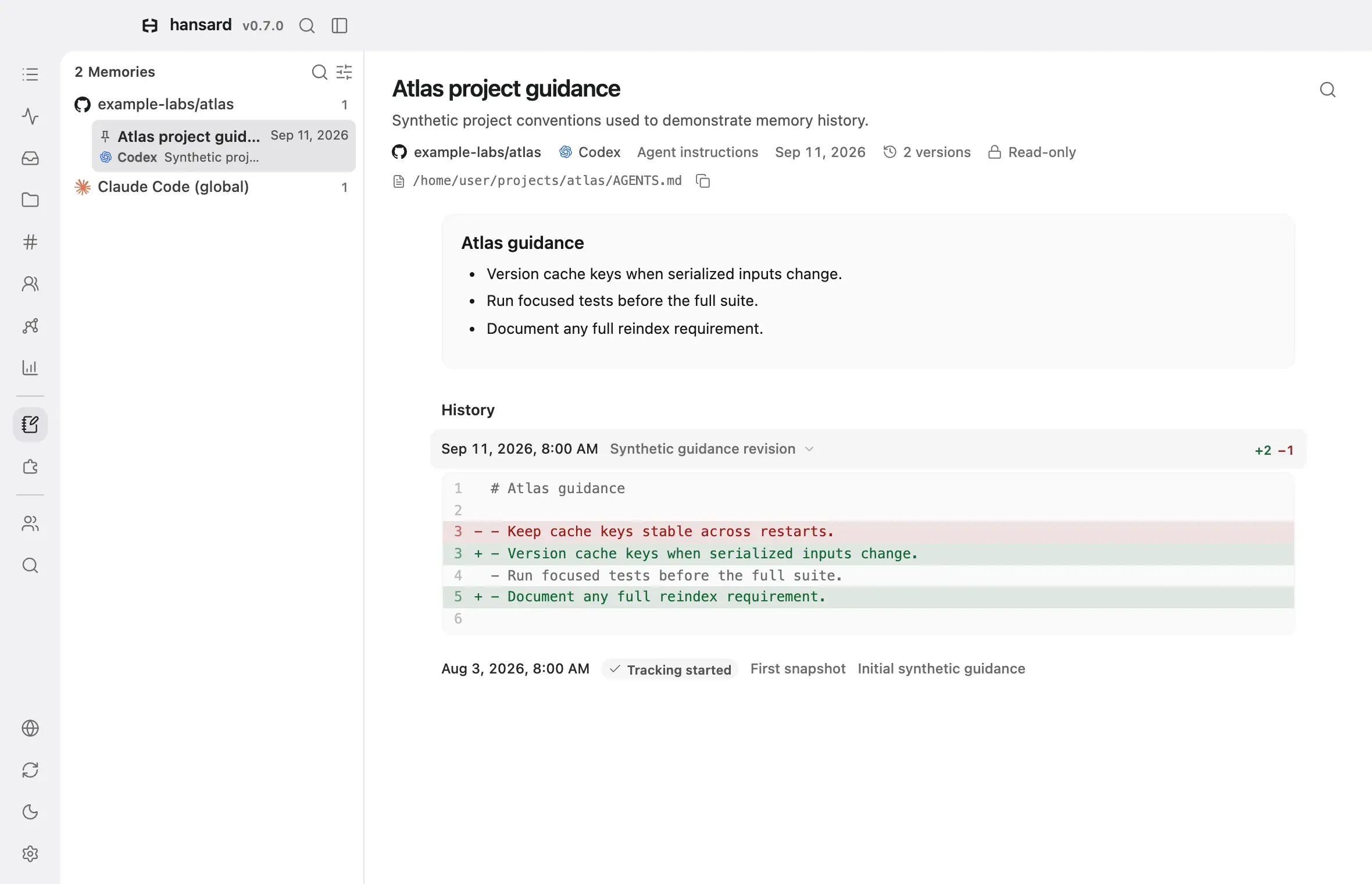
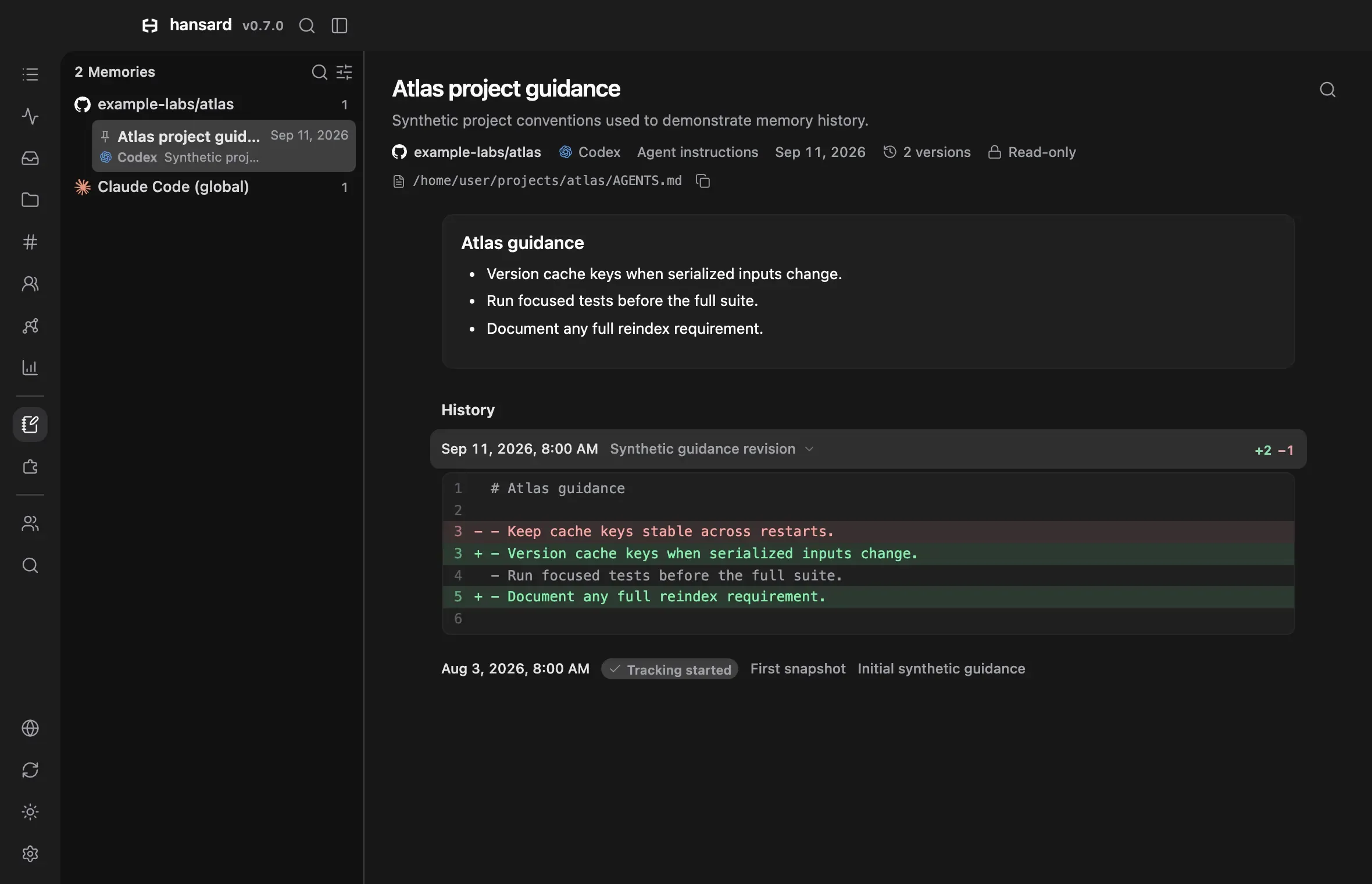
- Select Memories in the dock. Memories are grouped into project folders. Global memories appear in folders such as Codex (global).
- Select a memory to read its current content. The line under the title shows its project (or Global), harness, kind, and last update time. The file path sits below it, with a button that copies the full path. When the file starts with frontmatter, such as a name and description, those fields are folded into a Properties row above the text; select it to show them.
- To see every saved revision, select the version count (for example 3 versions) under the title, or scroll to History. Each revision shows how many lines it added and removed compared with the revision before it, for example +12 −3. Select a revision to see the changed lines. The first direct backup carries a checkmark and Tracking started. Earlier versions recovered from transcripts are labeled Recovered version or Recovered creation.
- If the memory was written during a conversation Hansard archived, select Open conversation (the speech bubble icon) at the top right to read that conversation.
To narrow the list, select Filter memories (the sliders icon beside the search icon) and choose a Harness, Type, Scope (project or global), Device, Updated time, or Folder. The filters also apply to search results. Reset clears them.
To search every memory’s current content, use Search memories… at the top
of the sidebar, or press /. To find text inside the open memory only, select
Find in memory or press Cmd+F (Ctrl+F in a browser on Windows or
Linux). Search covers current content and metadata, not older revisions.
When a conversation is linked to memories, a Memory link appears in the line under the conversation title. Select it to open the linked memory.
The Memory tab on the Stats page charts how many memories each harness keeps, how the archive grows, and which memories have gone unchanged for a long time.
Recover history from older conversations
Section titled “Recover history from older conversations”Local imports finish by scanning archived file operations for earlier memory
versions. The watcher repeats this during its regular memory backup. For an
existing archive, run hansard memory backup; no reimport is required. The
first pass reads archived events, and subsequent passes reuse unchanged
transcripts.
Each device reconstructs its locally imported transcripts. Received archives keep the memory history supplied by their source device through Personal Sync.
Recovery uses successful full-file writes, explicit file creations, supported
patches and string replacements, literal quoted cat heredoc writes, and
structured reads that explicitly identify complete file contents. It recognizes
standard Claude Code and Codex memory locations and project instruction files,
plus file paths already known to memory backup. A complete version supplies the
base for later edits, even when conversations import out of order.
Each recovered revision links to its source conversation. Missing bases, unsupported changes, and patches that do not match leave a History gap; opening the next known revision shows its contents without inventing a diff. A full-file write proves a version existed then, but only an explicit creation is labeled Recovered creation.
Tracking started marks when Hansard first backed up the file directly. It is distinct from the file’s modification time. Backups capture observed changes and can miss edits between passes. Recovery never replaces a directly captured current version or writes recovered contents into the provider’s files. Memories recovered only from transcripts stay read-only until a direct backup captures them, including files deleted before backups began.
Edit a memory file in the app
Section titled “Edit a memory file in the app”You can edit memories that Hansard read from a file on this device.
- Open the memory in Memories.
- Select Edit memory (the pencil icon) at the top right.
- Change the text, then select Save (or press
Cmd+S,Ctrl+Son Windows or Linux). Cancel leaves the file unchanged.
Hansard writes your change to the harness’s own memory file first, then saves the new revision in History. The agent sees the edit the next time it reads its memory.
The Edit button does not appear for these memories. Except for binary records, a Read-only label under the title marks them; point at it to see why:
- Cloud memories from ChatGPT, Claude.ai, Cursor, and Devin. The Read-only label names where to change each one on its own platform.
- Memories received from another device through Personal Sync.
- Binary memory records, which Hansard keeps byte for byte but cannot display.
- Any memory, when the app runs in read-only mode.
Review proposed lessons
Section titled “Review proposed lessons”Hansard can draft short lessons from what failed and what was fixed in your agents’ conversations, and it checks your memories against each repository. It never adds a lesson to a file on its own. A Proposed row at the top of the Memories sidebar shows how many lessons wait for you. The row appears only when there is something to review.
- Select Proposed in the Memories sidebar.
- Read a lesson under To review. Add to names the file the lesson goes to, and the change below it shows the exact line Hansard adds at the end of that file. To use another file, choose it from the menu.
- To check where a lesson came from, select a conversation under Why Hansard suggests it. The conversation opens at the message the lesson cites.
- Select Approve to add the line. Select Edit to change the words first, or Dismiss to drop the lesson.
The same lessons also wait in Review in the dock.
In your files lists the lessons you approved. If one turns out to be wrong, select Mark harmful. Hansard first shows the lessons it retires, including every lesson built on it, and the lines that stay in your files. To take a retired lesson’s line out of its file, select Remove line.
Out of date lists memories that name a file, script, or flag the repository no longer has, or that a newer memory replaced. Select Retire to mark one as no longer in force. The memory file stays as it is.
Hansard drafts lessons on its own only after you run
hansard config set dreaming.enabled true. The checks for out of date
memories run without it.
Manage memories from the CLI
Section titled “Manage memories from the CLI”Back up memories now instead of waiting for the watcher:
hansard memory backupSearch current memory content and metadata:
hansard memory search "deployment checklist"hansard memory search "test conventions" --repo github.com/example/app --limit 10With search by meaning on (see Search), memory
search also finds memories that describe the same thing in other words, and a
match by meaning names the lines that hold your search words. Add
--mode keyword to match the words as written.
List memories, show one, or export all of them:
hansard memory list --provider claude_codehansard memory show <memory-id>hansard memory export > memories.jsonhansard memory export prints every memory with its content as JSON.
Skills are not memories, so memory backup does not capture skill folders.
Skill folders that earlier backups archived stay in the archive, but
Memories, hansard memory list, search, and Stats leave them out.
hansard memory export and hansard memory show still include them. See
Skills, plugins, and MCP servers for the skills each
harness has installed.
| Option | Commands | Effect |
|---|---|---|
--provider <harness> |
search, list, duplicates |
Only memories from that harness, such as codex or claude_code. |
--repo <key> |
search, list |
Only memories filed under that project, such as github.com/example/app. |
--origin <origin> |
search, list |
file for memory files on this device, provider-cloud for cloud memories, or manual-import for imported ChatGPT memories. |
--mode <mode> |
search |
hybrid, keyword, or meaning, as in Search. |
--limit <n> |
search, duplicates |
Maximum number of results. |
--offset <n>, --max-chars <n> |
show |
Print part of a long memory, up to 50,000 characters at a time. |
--json |
backup, search, list, show, duplicates |
Machine-readable output. |
Filters match exactly. Editing memories is available only in the app.
What Hansard backs up
Section titled “What Hansard backs up”While the watcher runs, Hansard backs up memories every 15 minutes. Each backup saves a full copy of a memory only when its content changes, so the archive keeps one snapshot per revision. Memories stay in the archive after the harness deletes or rewrites them.
| Harness | What Hansard backs up |
|---|---|
| Claude Code | Project memory in ~/.claude/projects/<project>/memory, plus CLAUDE.md and memory files in ~/.claude. |
| Codex | ~/.codex/memories, ~/.codex/AGENTS.md, and rollout summaries. |
| Gemini CLI | ~/.gemini/GEMINI.md. |
| Antigravity | Knowledge and implicit memory stores in ~/.gemini/antigravity. |
| Grok Build | Global, workspace, and session-log memories in ~/.grok/memory. |
| Prime Agent | Global continual-harness state and refinement history. |
| Windsurf | Global rules and local memory records. |
| Cursor | Pending memories and user rules from Cursor’s global state database. |
| Claude Science | Account and project memories from Science’s local and organization stores, as read-only snapshots. See Claude Science. |
| Claude.ai | Memories in a Claude.ai export that you import. See ChatGPT and Claude.ai exports. |
| ChatGPT | Memories you copy from ChatGPT and import. See Import ChatGPT memories. |
| Devin | Cloud knowledge, when DEVIN_API_KEY or the memory.devinApiKey setting holds an API key. |
A memory that belongs to one repository is filed under that project. Other memories, such as global instruction files, are filed under global scope. A Codex rollout summary follows the project of the conversation it summarizes.
Project instruction files such as AGENTS.md, CLAUDE.md, and GEMINI.md come
from the working folder of each archived conversation. Files one folder deeper
count only inside a repository, so a temporary or scratch folder never
contributes the checkout copies it holds. The next backup removes any such
copies an earlier version archived.
Import ChatGPT memories
Section titled “Import ChatGPT memories”ChatGPT does not include memories in its data export. To archive them:
-
In ChatGPT, open Settings → Personalization → Manage memories.
-
Copy the memories into a text file, such as
chatgpt-memories.txt. -
Import the file:
Terminal window hansard memory import chatgpt ./chatgpt-memories.txt
If you imported more than one ChatGPT account, add --account <name> with the
account ID or label. Importing again updates the same memory and saves a new
revision when the text changed. Imported ChatGPT memories are read-only in
Hansard.
Let agents read memories
Section titled “Let agents read memories”Agents can search memories from every harness, so a Codex session can use a preference that Claude Code recorded. Memory retrieval is enabled by default when installing an agent integration:
hansard integrations add-to claudeReplace claude with codex, antigravity, devin, opencode, or grok.
The agent receives the recall-memories workflow (the /recall-memories
command in Claude Code and OpenCode) and two read-only tools: search_memories
searches all providers and projects unless filters narrow the results, and
get_memory reads one memory, opening at the line a search hit names. Neither
tool changes a memory.
See Recall in your agents for installing and refreshing agent integrations.
Combine memories across agents
Section titled “Combine memories across agents”Agents often record the same fact in different places, or keep instructions that
disagree. The unify-memories skill helps you clean them up. Hansard installs
it for Codex and Claude Code with the recall integration. In Claude Code, run
/unify-memories. In Codex, ask the agent to unify your memories.
The agent then works through these steps:
- Backs up and exports every memory, and reads the repository’s
AGENTS.md,CLAUDE.md, andGEMINI.mdfiles. - Lists duplicates, contradictions, stale entries, and facts that only one agent knows, with a proposed action for each.
- Waits for you to keep, discard, or merge each finding, and to choose where the result lives.
- Edits only the memory files you approved. For cloud memories, it gives you replacement text to paste on that platform.
- Runs another backup so History records the edits.
With search by meaning on, the agent starts
from hansard memory duplicates, which you can also run yourself. It lists
pairs of memories from different providers that cover the same subject, with
the lines of each side and a score:
hansard memory duplicateshansard memory duplicates --provider codex --min-score 0.75A pair scored 0.75 or higher usually records the same fact. A pair from 0.6 to
0.75 shares a subject, which is where conflicting instructions show up.
Identical copies of one memory are left out. --same-provider also pairs one
provider’s own memories.
Common questions
Section titled “Common questions”Which agent memory files does Hansard back up?
Section titled “Which agent memory files does Hansard back up?”Claude Code project memory and CLAUDE.md, Codex memories and AGENTS.md,
Gemini GEMINI.md, Antigravity knowledge, Grok Build memories, Cursor pending
memories and user rules, Windsurf rules, Claude Science memories, and Devin
knowledge. It also keeps the
instruction files from each archived conversation’s working folder, and
ChatGPT and Claude.ai memories you import. The table in
What Hansard backs up lists each location.
Does editing a memory in Hansard change the agent’s own file?
Section titled “Does editing a memory in Hansard change the agent’s own file?”Yes. Hansard writes your change to the harness’s memory file first, then saves the new revision in History, and the agent sees the edit the next time it reads its memory. Cloud memories, imported memories, and memories received from another device are read-only.
Can Claude Code use a memory that Codex wrote?
Section titled “Can Claude Code use a memory that Codex wrote?”Yes. With recall installed, an agent gets search_memories and get_memory,
which search memories from every harness and project in the archive. Neither
tool changes a memory. See Let agents read memories.
How do I merge duplicate or conflicting memories across agents?
Section titled “How do I merge duplicate or conflicting memories across agents?”Run /unify-memories in Claude Code, or ask Codex to unify your memories. The
agent lists duplicates, contradictions, and stale entries, waits for your
decision on each one, and edits only the files you approve. See
Combine memories across agents.
Troubleshooting
Section titled “Troubleshooting”The Memories view is empty. Run hansard memory backup, or start the
watcher. A harness appears only after it has written memories. For example,
Codex writes memories only when its memories feature is on. See
Harness settings to check it.
Devin knowledge is missing. Set DEVIN_API_KEY, or store the key in the
memory.devinApiKey setting, then run hansard memory backup.
An agent cannot find memories. Run hansard integrations sync to refresh
older installations, then restart the agent session so it loads the memory
tools. An explicit --no-memories setting is preserved; rerun
hansard integrations add-to <agent> to enable them again.