What leaves your machine
Hansard keeps its archive on this machine. Importing, searching, Stats, memories, and the app itself run without sending your conversations anywhere. The features on this page are the exceptions.
- App
- Settings → Privacy & Sharing
What stays on this machine
Section titled “What stays on this machine”Hansard reads each harness’s history and writes its own copy under
~/.hansard/ (or HANSARD_HOME). That copy includes conversations, the
original harness files, attachments, memories and their history, search
indexes, settings, and credentials for the features below.
Treat the whole folder as private. Conversations can contain source code, credentials, file paths, personal messages, and the output of commands that read files outside the project. Redaction removes known secret patterns from the conversation text, but never from the original files. See Redaction.
Labeling and summaries always remove common secret patterns from outgoing conversation text, even when archive redaction is off. This happens before text limits apply. Pattern matching cannot remove every secret or identifier.
The Hansard app and CLI send no analytics or crash reports to the publisher. Local activity collection is separate from uploads to external services.
Claude Code activity
Section titled “Claude Code activity”While the watcher runs, it listens on localhost:4318 for Claude Code’s own
OpenTelemetry export. It keeps each request’s tokens, cost, and time, tool
names and how long each call waited for your decision, compactions, and the
kind of each API error, for 14 days. Prompts, replies, tool input and output,
commands, file paths, error text, and account and organization IDs are never
kept. Personal Sync and Teams never carry this activity, and unrecognized
services are dropped. The collector also accepts supported agent services.
With local activity enabled, Hansard can configure supported
agent launches, including Codex, to send metadata to this local collector.
These launch overrides do not write those agents’ configuration files.
Desktop setup and hansard init select Claude Code activity by default
under What leaves this computer. Existing explicit choices remain. Claude Code
reports timing and errors to Hansard on this Mac. After setup is accepted,
Hansard adds a few lines to Claude Code’s settings.json. Turning the setup
row off writes nothing to that file. hansard init --no-telemetry also turns
it off. Hansard never replaces an export that already points elsewhere.
After setup, Settings → Handoff & helpers → Activity → Send Claude Code
activity to Hansard controls those settings entries. Turning it off removes
only variables that still have Hansard’s values. Claude Code that Hansard
starts receives the variables only while Hansard’s local listener runs.
To stop the listener, turn off Activity listener in the same section, or
run hansard config set collector.enabled false. See
Claude Code activity for what it
shows.
Features that send data
Section titled “Features that send data”hansard init asks Let your agents work together? with two unanswered
choices: Agent messaging and Helper agents. The app’s setup offers the
same two switches on Make it yours. Helpers stay unavailable until
messaging is on. Skipping or running hansard init --yes alone keeps both
off. Messages and helper instructions become part of agent conversations and
can go to their model providers. Remote Agent messages also requires
permission for each paired device.
Importing, browsing, searching, and Stats run here with no account.
- Plan usage tracking, preselected in the Mac app setup
- Link icons for sites in conversations
- Update check
- Deep Recall
- Recall, continue, and helper agents
- Cloud imports
- Conversation labeling and automatic labeling
- Personal Sync
- Teams
- Slack
- Hosted viewer
- Conversation summaries
- Dictation with OpenAI
- Codex subagent message recovery
Network and privacy table
Section titled “Network and privacy table”New desktop setup selects update checks, link icons, plan usage tracking, and local activity collection. It selects Search by meaning when disk space permits, and cloud agents that have their own product’s sign-in. Shared sign-ins, such as GitHub CLI for the Copilot coding agent, stay unselected. Existing explicit choices remain. Labeling, automatic labeling, conversation summaries, sharing, and helper agents start off.
A selected feature makes requests when its trigger occurs. Turning off automatic work does not prevent an explicit command or refresh. Destinations can see your IP address and request metadata. Custom endpoints, provider tools, redirects, and plugins can use additional hosts. Localhost and loopback mean this computer.
| Feature | Destination | Payload | Default | Trigger | Control |
|---|---|---|---|---|---|
| Update checks | registry.npmjs.org for the CLI/viewer; www.hansard.dev for the desktop app; configured registry or manifest overrides |
Release request; CLI requests include the Hansard version. No archive content. | On | Eligible interactive CLI use or viewer/app update check. Successful checks are cached for one day (CLI) or one hour (desktop). | Turn off Check for updates, set updates.checkOnStartup false, or set HANSARD_NO_UPDATE_CHECK=1 or NO_UPDATE_NOTIFIER=1. |
| Requested installation and updates | npm registry; Hansard download host and installer redirects | Package or installer request, platform and architecture where needed. No archive content. | Only when requested | Install or update command, or an accepted desktop update | Do not request installation or an update. Disabling update checks alone does not block a requested download. |
| Search by meaning and screenshot search | huggingface.co and its hf.co download hosts; github.com, release-assets.githubusercontent.com, objects.githubusercontent.com |
EmbeddingGemma 2 model and llama.cpp runtime requests. Text and images are embedded locally, never uploaded for this feature. | Meaning search selected in setup when disk space permits; vision files require screenshot search | Installation queued after import, or an explicit enable/install action. After a Hansard update that moves the runtime version, the next indexing pass downloads the new runtime, about 12 MB. About 330 MB for text; about 880 MB with vision, with about 540 MB retained. | Turn off Search by meaning in setup or Settings → Imports → Search, or run hansard embeddings disable. |
| Link icons | Each linked website, including redirects for its icon or home page | Host and icon/page request. No conversation text. | On | View a conversation with links; icons are cached for a week | Turn off Link icons, or set web.linkFavicons false. |
| Plan usage tracking | Provider usage and authentication services listed below; configured provider CLIs or router | Authentication, account selectors, quota and spend requests. No conversation content. | Selected in desktop setup; scheduling stays off until enabled | Setup acceptance, scheduled capture, or an explicit account refresh | Turn off Track plan usage, or run hansard config setup --no-track-usage. Requested refreshes and Details reads remain separate. |
| Live provider details | Cursor dashboard, GitHub/Copilot, Factory, or the signed-in Augment service | Authentication, session identifiers, usage filters, subscription or child-session requests. No conversation text. | Available with a matching sign-in; no separate switch | Open a supported local conversation’s Details or agent details. Successful provider results are cached for one minute. | Close Details to stop its refreshes. To prevent these reads entirely, remove the corresponding provider connection/sign-in. Turning off plan usage tracking does not disable them. |
| Cloud imports | Provider history services listed below, including returned attachment hosts | Authentication, history identifiers, pagination and filters. History downloads into Hansard; no archived conversations are uploaded. | Desktop setup selects sources with their own product’s sign-in | Accepted import, requested import, or selected-source refresh; normally every six hours, every minute for Cursor | Turn off each source in Settings → Imports → Cloud agents. Explicit import commands still run when requested. |
| Devin knowledge backup | api.devin.ai or the configured Devin endpoint |
API-key authentication and a knowledge-list request. No archive content. | Available when DEVIN_API_KEY is set |
Memory backup | Remove DEVIN_API_KEY from the process environment to omit this source. |
| Account router installation | CLIProxyAPI releases on GitHub and GitHub release download hosts | Runtime download request. No archive content. | Off until router setup | Install or update the managed router | Do not enable the managed router. Stop it from Accounts when no longer needed. |
| Account routing and sign-in | Local router, then each selected provider’s API and OAuth services | Sign-in credentials and refresh tokens; routed prompts, attachments, tool inputs/results, and responses | Off until a client is connected | Provider sign-in, token refresh, quota query, or a routed agent request | Disconnect each routed client and stop the router in Accounts. Provider use outside Hansard has its own settings. |
| Cloud inference connections | Amazon Bedrock and AWS authentication; Google Vertex AI and Google authentication; openrouter.ai, or a configured gateway |
Provider credentials, model requests, prompts, attachments, and tool context | Off until configured | Run an agent with the selected cloud connection | Disconnect the cloud connection in Accounts and remove its client configuration. |
| Account reset redemption | chatgpt.com |
Authentication, reset-credit ID and redemption request ID | Only when requested | Confirm Use reset | Do not confirm Use reset. Background usage reads never redeem a reset. |
| Conversation labeling and Behavior summaries | api.anthropic.com, api.openai.com, api.typesafe.ai; Claude/Codex CLI’s configured provider; or the configured Ollama endpoint |
Redacted conversation digest, up to 16,000 characters for labeling. Loopback Ollama keeps it local. | Labeling and automatic labeling off; Behavior summaries require a request | Enable labeling, run labeling explicitly, or request a Behavior summary | Turn off Label conversations or set classify.enabled false. classify.auto.enabled false stops only automatic labeling. |
| Conversation summaries | Selected model provider or Ollama endpoint; Codex is the default backend | Redacted digest of your messages, agent replies, and tool calls, up to 120,000 characters | Off | Enabled watcher summarizes an ended conversation, or a requested summary | Turn off Summarize conversations after they end, or set summaries.enabled false. Requested summaries still run. |
| Recall, Continue, agent messaging, helper agents, and Deep Recall | Receiving agent’s configured provider, gateway, and tools | Archive excerpts, messages, and helper instructions become agent context | Recall integrations offered in setup; messaging and helpers off until accepted; Deep Recall only when requested | Agent calls a Hansard tool, or a person starts recall, a continuation, a message, or a helper | Remove the agent’s Hansard integration to stop recall access. Disable messaging and helpers separately. Do not start on-demand runs. |
| Dictation | On-device engine, api.openai.com, browser speech service, or custom command destination |
Recorded audio for transcription | Automatic engine selection; OpenAI only if no on-device engine is available and OPENAI_API_KEY is set |
Start dictation | Select an on-device engine, or set dictation.backend off. Browser speech recognition follows the browser’s service settings. |
| Whisper model installation | huggingface.co and its download hosts |
Model download request, without audio | Only when requested | Install the local dictation model | Do not request model installation. An installed local model transcribes on this computer. |
| Codex subagent message recovery | OpenAI through the configured Codex client | Encrypted collaboration messages for decoding | Off | Requested repair, or enabled watcher recovery | Set imports.codexSubagentMessages.enabled false. Explicit repair commands still run when requested. |
| Stats Intelligence Index | artificialanalysis.ai |
API-key authentication and benchmark request. No archive content. | Off until a key is available | Open Stats Analysis; cached results refresh at most daily | Remove the saved key and unset ARTIFICIAL_ANALYSIS_API_KEY. |
| Personal Sync and storage copies | Chosen S3-compatible bucket, cloud-drive services listed below, or synced/network folder | Complete backup, including original provider files, memories, attachments, artifacts, settings, classification results, board posts, and plan usage with account names | Off | Configure a target; scheduled or requested upload/receive | Disconnect each Personal Sync target. Remove additional storage copies separately. A folder’s sync client has its own controls. |
| Teams and Team storage copies | Team’s bucket or shared folder, including its sync provider | Whole matched conversations, tool output, attachments, artifacts, and opted-in shared boards. No raw provider backups or memory archive. | Off | Accept membership and its exact upload policy; scheduled or requested sync | Leave team for each Team. Remove additional storage copies separately. |
| Remote access over direct TLS, Tailscale, or SSH | Paired computer, SSH jump host; Tailscale’s control and relay services when used | Pairing and authentication; authorized messages, attachments, approvals, project data, and agent output | Off until configured and paired | Pair, connect, or use a remote feature | Turn off Allow access from other devices, remove allowed devices, or set HANSARD_REMOTE_CONTROL=0. Tailscale has separate controls. |
| Internet tunnel and relay | GitHub for the tunwg binary; configured relay API and public gateway address | Binary request, tunnel registration, health probes, and remote-access traffic | Off; no public relay configured | Enable an Internet connection with a configured relay; reconnect and health checks while running | Disable the Internet connection or remote access. Remove the relay configuration. |
| Hosted viewer and phone access | Viewer host and authorized connecting browsers/devices | The viewer’s whole archive for signed-in readers; phone access follows its granted scopes. Includes conversations, attachments, and permitted controls | Viewer binds to loopback; remote/phone access requires setup | Bind or expose a viewer, pair a phone, or open its URL | Stop the hosted viewer, revoke access, or disable remote access. Browser caches require separate removal. |
| Slack notifications | slack.com API or configured Slack API base |
Configured recaps, live message streams, or digests from the redacted archive | Off | Configure a route; event, schedule, or requested post | Turn off Post to Slack or run hansard notify slack disable. |
| Slack bot | slack.com, Slack’s returned Socket Mode WebSocket host, and the bot agent’s model provider/tools |
Approved channel messages, instructions, agent context and output, approvals, and scheduled results | Off until configured and approved | Bot connection, permitted Slack event, approved run, or enabled schedule | Turn off the Slack bot connection and its channel roles in Settings. Notification controls are separate. |
| Browser capture: provider reads | Enabled provider’s HTTPS site/API and permitted file hosts; Muse uses its secure WebSocket; Qwen also uses auth.qwen.ai |
Provider’s own authentication and history/export requests; downloaded conversations and files | All providers off until enabled with site permission | Capture schedule or explicit capture in a signed-in provider tab | Turn off the provider in the extension, revoke its site permission, or disable the extension. |
| Browser capture: archive delivery | Paired loopback receiver, normally 127.0.0.1:4319 |
Captured conversations, account labels, metadata, attachments, and export bytes | Requires pairing and an enabled provider | Deliver capture or retry queued work | Disable capture or unpair the extension. Existing archive data remains. This delivery is local, not a publisher upload. |
| Perplexity captured images | Public image/chart hosts named by the captured page | HTTPS image request, without cookies, sign-in, or archive content | On while Perplexity capture is enabled | Local receiver processes a Perplexity capture | Turn off Perplexity capture. Limits are 100 MiB per file and 500 MiB per conversation. |
| Plugins and MCP tools | Named Git/marketplace host during installation; configured package registries, MCP servers, and tool services at runtime | Install requests; enabled tool arguments, authentication, and tool results | Plugin installation is explicit; tool availability follows bridge settings and approvals | Add/update a plugin, start a configured server, or call an enabled tool | Remove the plugin or disable its tools in Skills & plugins. Review each plugin’s own destinations. |
| Hansard MCP host | Local Unix socket/named pipe and authenticated loopback HTTP, normally 127.0.0.1:7839 |
Tool calls and archive results shared with local agent integrations | Host runs with the watcher; integrations require setup | Local agent calls Hansard | Remove Hansard’s integration to stop that agent’s access. Results can then reach the agent provider as described under Recall. |
| Local activity collection | Hansard’s local collector, normally localhost:4318 |
Allowed timing, token, cost, tool-name, approval, error-kind, and context-count metadata. Prompt/reply text, tool contents, paths, and account identities are discarded. | Collector on; Claude Code activity selected in setup; supported Hansard-launched agents use the enabled local collector | Watcher receives agent exports; accepted setup configures Claude Code, other supported launches use per-process overrides | Turn off Send Claude Code activity to Hansard and set collector.enabled false to stop the listener. This is local collection, not vendor analytics. |
| Other local services | Loopback model server, provider language servers, viewer APIs, local sockets, and named pipes | Embedding inputs, local history recovery requests, Stats data, previews, and process/control messages | Runs as the corresponding local feature needs it | Search, import/recovery, local viewer or desktop use | Disable the corresponding feature or close its client. A deliberately remote viewer uses the hosted-viewer boundary above. |
| Share links and exported files | Local file/clipboard; current viewer URL for Copy link | Selected export or a link to the original conversation | Only when requested; no public upload service | Save/copy an export or link; recipient opens a reachable viewer | Do not share the file/link; revoke viewer access when needed. A copied link does not make a private viewer public. |
| Website requests and download counts | Hansard website host; configured Redis service receives aggregate installer counts | Page/download request. Counter stores only UTC day, platform, version, and count; no cookies, IPs, device IDs, or referrers. Hosting logs are separate. | Website requests only when visited; counting requires deployment configuration | Visit the website or start an installer download | Do Not Track or Global Privacy Control suppresses download counting. Direct downloads also bypass the counter. Operators can disable DOWNLOADS_COUNTER. |
| App analytics and crash reporting | No Hansard analytics or crash-upload endpoint | No automatic analytics or crash-report payload. Diagnostics stay local unless explicitly shared. | No automatic upload | No built-in upload trigger | Review any diagnostic file before sharing it. OS and provider crash-report settings are separate. |
| Research enrollment and sealed submissions | Participant-selected research platform | Enrollment/consent identifiers; reviewed monthly aggregates and survey answers sealed for the study key; withdrawal requests | Separate Research app; nothing enrolled or uploaded by installing Hansard | Open a study, consent, submit the reviewed file, or withdraw | Do not enroll or submit; use study withdrawal for prior submissions. Read the separate research disclosure linked below. |
| Research labeling | Study’s label relay and its Anthropic/OpenAI backend, or loopback Ollama | A separate redacted conversation digest, up to 16,000 characters, plus label instructions. This is not the sealed aggregate upload. | Only for a study that requests labels, after participant choice/consent | Start the study’s labeling step | Use local labeling where the study allows it, exclude samples, or decline labeling/participation. Read the research labeling disclosure. |
| Research platform services | Configured mail sender, S3-compatible storage, and labeling model endpoints | Researcher sign-in email/link; sealed submission objects; labeling requests | Operator-configured, outside the Hansard app | Send a sign-in link, store/read/delete a submission, back up storage, or run labeling | Operators configure or disable each service. Study retention and withdrawal rules govern prior data. |
| Maintainer build, data refresh, and publishing tools | npm, Node.js, GitHub, models.dev, OpenCode Zen, O*NET, configured hosting/storage, and IndexNow | Dependency/runtime downloads, public model/pricing datasets, release files, website assets, and public sitemap URLs | Never run by normal installed-app startup | Maintainer explicitly runs a build, catalog refresh, release, or website submission script | Do not run these maintainer commands. Their configured providers govern authentication and retention. |
Provider destinations
Section titled “Provider destinations”Cloud imports use Anthropic (api.anthropic.com, claude.ai), Codex
(chatgpt.com), Copilot (api.github.com and the account’s returned Copilot
endpoint), Cursor (api.cursor.com), Devin (api.devin.ai), Jules
(jules.googleapis.com), Factory (api.factory.ai), OpenHands
(app.all-hands.dev), Warp (app.warp.dev), and Qoder (api.qoder.com).
Kilo Code uses api.kilo.ai, cloud-agent-next.kilosessions.ai, and
ingest.kilosessions.ai. Augment uses its signed-in augmentcode.com tenant.
Amp uses its CLI’s configured service. MiniMax uses agent.minimax.io,
agent.minimax.cn, or agent.minimaxi.com. Roomote and custom deployments
use the supplied server. Providers can return separate attachment hosts.
Grok Bot cloud history requires explicit selection. It uses api2.cursor.sh
and signed file URLs on storage.googleapis.com, its subdomains, and
subdomains of s3.amazonaws.com, cursor.sh, and cursor.com.
Plan usage uses api.anthropic.com, chatgpt.com, api2.cursor.sh,
api.cursor.com, cursor.com, api.factory.ai, api.github.com,
cloudcode-pa.googleapis.com, daily-cloudcode-pa.googleapis.com,
daily-cloudcode-pa.sandbox.googleapis.com, oauth2.googleapis.com,
server.codeium.com, api.kimi.com, api.kimi.ai, and
cli-chat-proxy.grok.com. Provider CLIs can use their own configured quota
and authentication hosts.
Personal Sync’s Google Drive connection uses accounts.google.com,
oauth2.googleapis.com, and www.googleapis.com. OneDrive uses
login.microsoftonline.com, graph.microsoft.com, and returned download
hosts. Dropbox uses www.dropbox.com, api.dropboxapi.com, and
content.dropboxapi.com. S3-compatible storage uses the chosen endpoint.
For synced folders, including iCloud Drive, the sync application controls
its own destinations and authentication.
Hansard Research is a separate application. Its participant disclosure describes enrollment, survey text, sealed submissions, and the separate labeling request. It also explains participant choices, local erasure, and withdrawal.
Review boundaries in the app
Section titled “Review boundaries in the app”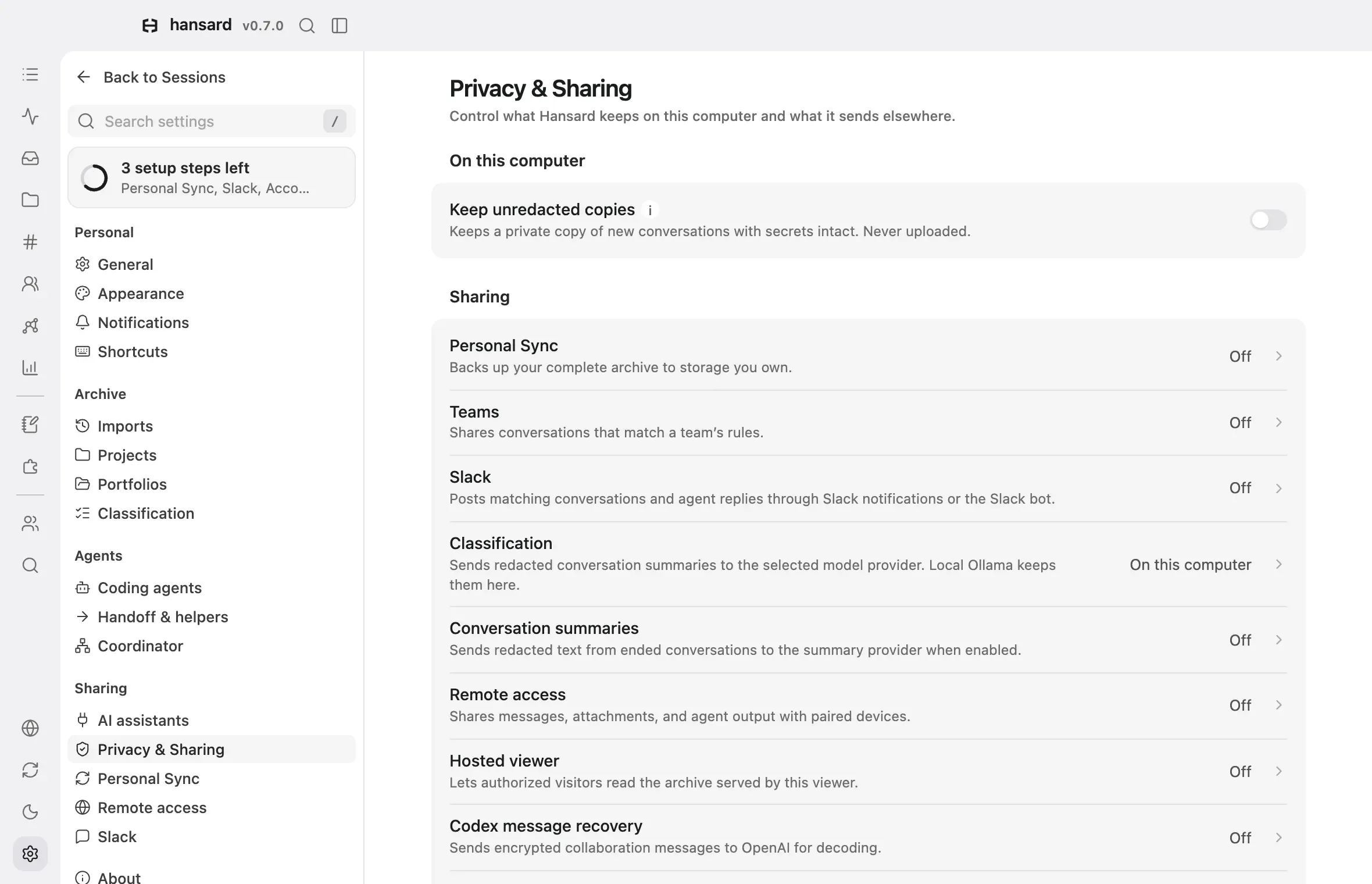
-
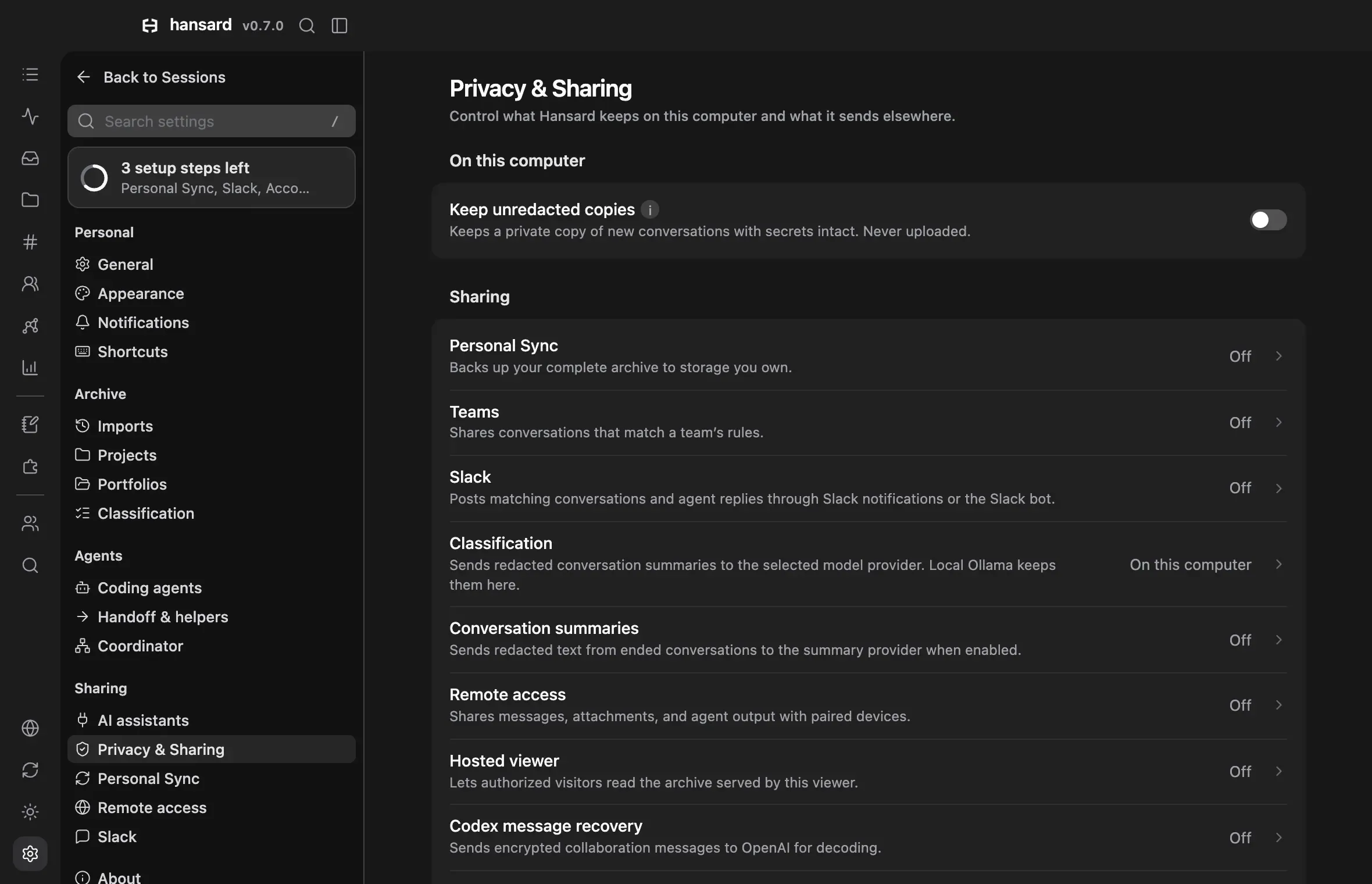
Open Settings → Privacy & Sharing.
-
Under Sharing, check each feature’s status. The count includes conversation summaries, remote access, hosted viewers, message recovery, and remote dictation. An unavailable status reads Review.
-
Select a row to open its page and review the destination, rules, and schedule.
-
On the Classification page, check the Provider. Each choice states whether summaries stay on this computer or which provider receives them.
-
Under When you ask, review actions that can send archive content to an agent’s provider. These actions are separate from the enabled-feature count.
Keep unredacted copies on the same page keeps the original form of each message redaction changes in new conversations. It never leaves this computer.
Before turning on a feature that shares conversations, open a few that it would send. Expand their tool calls and attachments and check what they contain.
Downloads from the Hansard website
Section titled “Downloads from the Hansard website”The Hansard website counts how often an installer download starts. Each start adds one to a total for that day (UTC), platform, and app version. Nothing else is stored with the count: no cookies, IP addresses, device or install identifiers, or the page you came from. The count covers starting a download from the website only; the installed app never reports its use.
A download is not counted when your browser sends Do Not Track or Global Privacy Control, or when the request comes from a link preview, a prefetch, or a crawler. The website’s hosting provider keeps its own standard request logs.
Data that already left
Section titled “Data that already left”Deleting a conversation from its harness does not delete Hansard’s copy. Deleting Hansard’s copy does not delete what a feature already sent: objects in a bucket and their older versions, Slack messages, model-provider logs, or browser caches of a hosted viewer. Remove those with each destination’s own controls.
Use the narrowest credentials each destination allows: a private bucket or prefix for Personal Sync, a new bucket or prefix for each Team, and channel-specific Slack routes.
Limits
Section titled “Limits”Hansard does not protect the archive from other programs or accounts that can read your files, from a compromised harness, or from credentials with too much access.
Never attach a real archive, conversation, configuration file, or identifying
screenshot to a public issue. Reproduce problems with made-up content, and
report security issues through the private channel in the repository’s
SECURITY.md.