What is Hansard
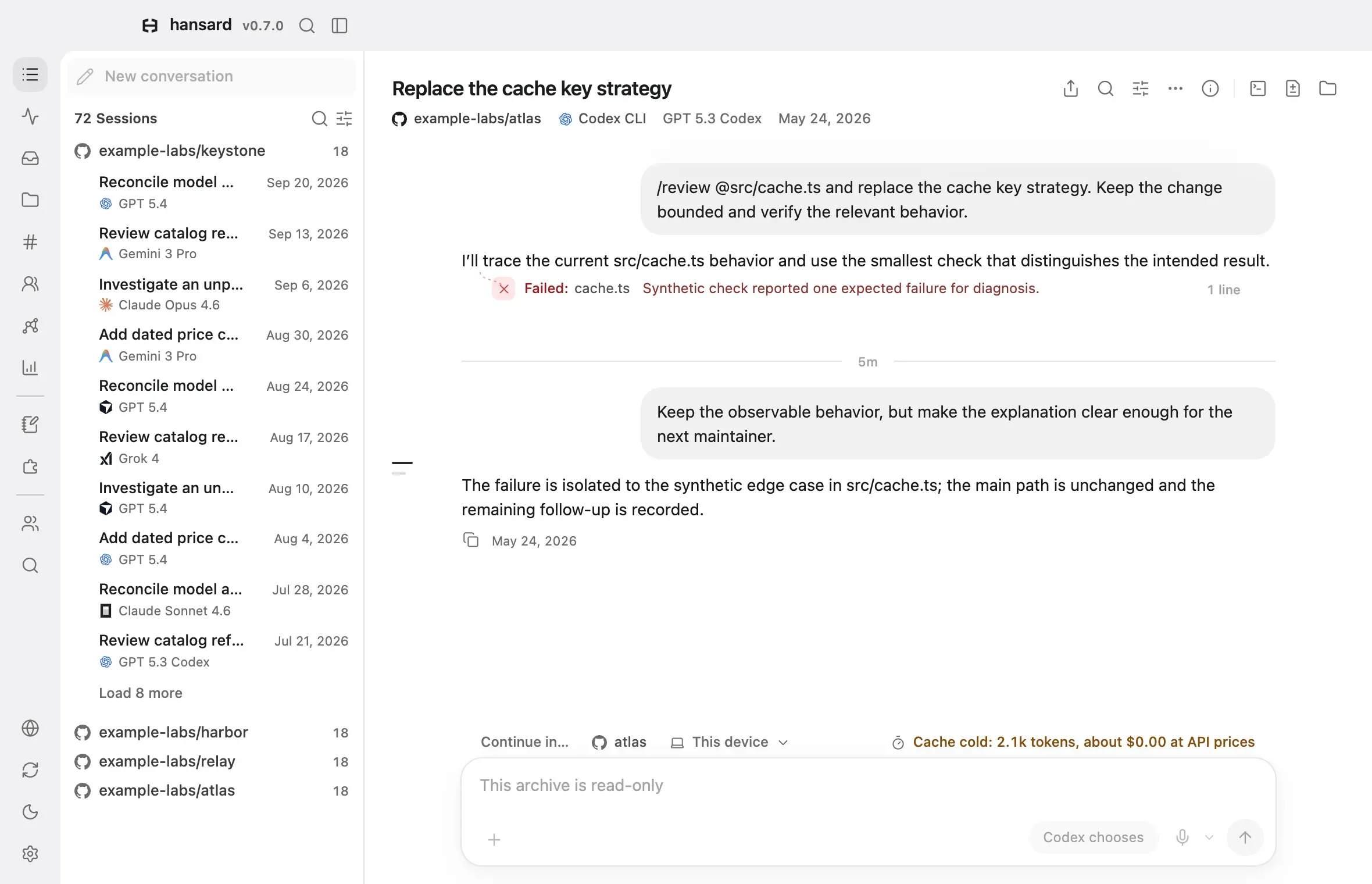
Hansard collects your conversations with coding agents into one archive on your computer. It imports history from more than 20 harnesses, the coding tools you work in, such as Claude Code, Codex, and Cursor. It also imports ChatGPT, Claude.ai, and Gemini exports. While it runs in the background, it adds new conversations as you work.
From the archive you can search and read every conversation, back up the memory files your agents keep, and see how you work across tools. Your agents can recall earlier sessions from the archive. Hansard keeps a copy of each original file, so your history stays available after a harness deletes it.
App or CLI?
Section titled “App or CLI?”Hansard comes as an app and as a command-line tool. Both use the same archive, so you can start with one and add the other later.
| Desktop app | App in a browser | CLI | |
|---|---|---|---|
| Install | Download the installer | Included with the CLI | npm install -g hansard |
| Needs Node.js | No, the runtime is built in | Yes, 22.12 or newer, or 20.19 or newer on Node.js 20 | Yes, 22.12 or newer, or 20.19 or newer on Node.js 20 |
| Runs on | macOS 13.5+ and Windows 10+ (64-bit) | macOS, Linux, and Windows | macOS, Linux, and Windows |
| Open it | From Applications or Start, or with hansard app |
hansard web |
Any terminal |
| Use it for | Reading, searching, stats, memories, and settings | The same interface as the desktop app | Terminals, scripts, coding agents, and maintenance |
Some tasks exist in only one place. The desktop app has the guided setup that needs no terminal, including Give your agents a memory for recall, and Settings → Coding agents adds recall to an agent later. The CLI also installs recall. Each feature guide lists where its feature is available.
What you can do
Section titled “What you can do”For the same features as the questions people ask about them, see Use cases.
Work with your archive
Section titled “Work with your archive”- Browse conversations: read full conversations, including tool calls, file edits, and commits.
- Search: find conversations by text, project, harness, model, tool, command, file, or commit.
- Deep Recall: ask a broad question and get an answer that cites several conversations.
- Memories: back up, search, and edit the memory and instruction files your agents keep.
- Graph: explore how projects and conversations connect.
Work with your agents
Section titled “Work with your agents”- Recall in your agents: let an agent search and read your past conversations.
- Continue in another harness: pick up a conversation in a different agent, or run agents on your other computers.
- Agent messaging: let Codex and Claude Code sessions in the same project message each other.
- Boards: keep project discussions and share selected boards with a Team.
- Running agents: see active agents and the conversations they are working on.
- Remote access: run agents on a paired computer.
- Helper agents: let an agent start helper sessions in another harness.
- Projects and coordinators: group work by project and give a project a coordinating agent.
- Skills, plugins, and MCP servers: see what each harness has installed and how it changed.
- Harness settings: compare retention, memory, model, and permission settings across harnesses.
- Permission suggestions: get Claude Code allow rules for the shell commands you run most.
- Dictation: speak prompts in the app instead of typing them.
Understand how you work
Section titled “Understand how you work”- Stats: activity, models, tokens, tools, and estimated spend.
- Compare periods: the Stats Changes tab compares one period of work with the period before it.
- Work classification: label conversations by kind of work and outcome.
- Accounts and plan usage: track plan limits and switch between agent accounts.
Bring in history
Section titled “Bring in history”- Supported harnesses: every harness Hansard imports from, with a guide for each.
- Background archiving: keep the archive current as you work.
- ChatGPT and Claude.ai exports: import the data exports those services send you.
Sync and share
Section titled “Sync and share”- Personal Sync: back up your archive and open it on your other computers.
- Teams: share conversations from selected repositories with a team.
- Slack: post conversation summaries and digests to a Slack channel.
- Hosted viewer: serve the app to other machines behind a password.
What stays on your machine
Section titled “What stays on your machine”Hansard needs no account. Importing, searching, the app, and recall all run on
your computer, and the archive stays in ~/.hansard until you turn on a feature
that sends data elsewhere, such as Personal Sync, Teams, or Slack. Features that
use a model, such as Deep Recall, send the relevant conversation text to the
model provider you choose. The archive holds everything your agents saw,
including code and any secrets in it, so protect it like the original history.
See What leaves your machine for the full list.
To begin, install the desktop app or install the CLI, then follow the Quickstart.